
On This Page
Table of contents
On This Page
Table of contents
If you spend time on computers, a bad keyboard experience can make Carpal Tunnel Syndrome (or general wrist pain) WAY worse.
But can we optimize our typing and gaming setup?
Yes, low-profile keyboards can reduce wrist pain from Carpal Tunnel Syndrome. Since you don’t have to raise your hands as much, they’re more comfortable and lead to less tension in the hands and fingers. However, there are several other factors you should consider while at your computer (to reduce Carpal Tunnel).
As a keyboard fanatic (who has suffered from wrist pain for YEARS)…I have tips for you!
Here’s my advice for reducing wrist pain at your computer:
How Do Low-Profile Keyboards Relieve Symptoms of Carpal Tunnel?
The overall height of the keys on a low-profile keyboard are shorter and closer to your desk than those on a standard keyboard, which helps to reduce the amount of stretching and tension on the muscles and tendons in the hand and wrist.
Also, the keyboard case itself is generally shorter.
- The less bending of your wrists, the better.
- The more you can rest your hands ON your desk (or bottom of your keyboard), the better. (“Floating” your hands as you type takes tension!)
Pro Tip: Carpal tunnel is a common condition that is caused by compression of the “median nerve.” That’s a little narrow tunnel surrounded by ligaments, bones, etc, and it can get squeezed or compressed! This causes numbness, tingling, and discomfort.
Low-profile keyboards are designed so that your hands (and wrists) will maintain a flatter, more comfortable position while typing.
Related reading: Are mechanical keyboards better for your wrists and hands?
Will Tilting My Keyboard Help With Wrist Pain?
Many keyboards come with “feet” on the bottom of their keyboards, which can optionally tilt the keyboard towards the user.
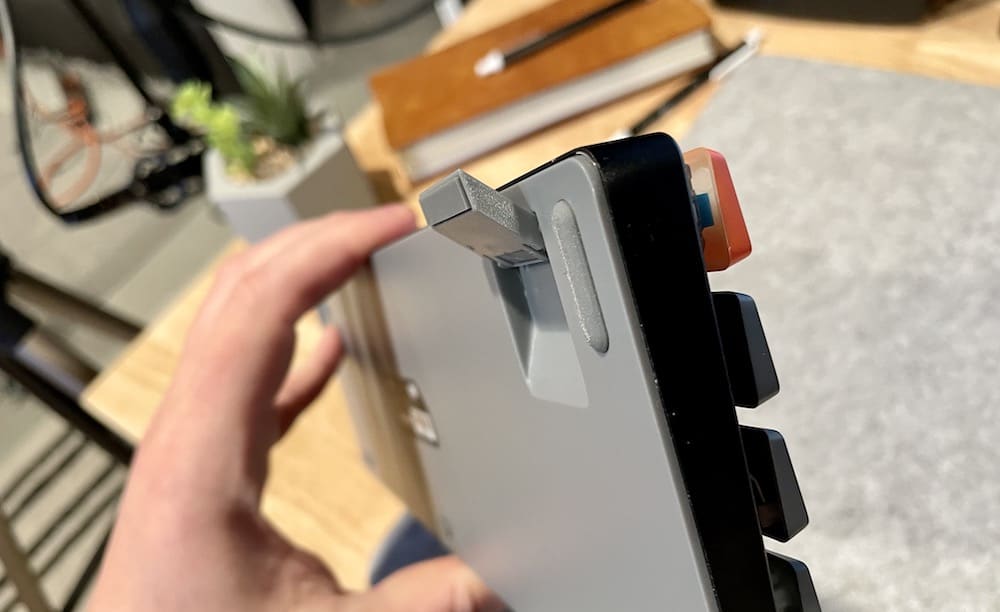 Keyboard feet on the bottom
However, this doesn’t always mean more comfort.
In fact, many people (myself included) actually feel MORE pain when typing on a tilted keyboard.
It depends on your hand size, your keyboard height, and your typing style. You might consider experimenting with tilting some keyboards in a store (or with keyboards you already own), before purchasing a new keyboard just because it tilts).
Will a wrist rest help?
That said, here are our recommendations:
Keychron K7 (Best Overall and Best for Mac)
It’s wireless, under $70-90, and less than 22mm tall!
I’m a huge fan of Keychron keyboards in general (I’m a Mac user, and they have a nice Windows/Mac toggle switch right on the outside of the keyboard). But if you’re on Windows, the Keychron K7 is still fantastic.
But…it’s a 60% sized keyboard, meaning it lacks the…
- number pad
- dedicated arrow keys
- the function keys
- Home, End, Delete, and PageUp/PageDown keys
It’s far more portable at this size, but probably not for everybody.
Corsair K70 – Best for Gaming (And Best Full-Size Keyboard)
To begin with, almost ANY mechanical keyboard is going to be great for gaming, but this one happens to have 2 great features:
- Low-profile design
- A detachable wrist rest!
A wrist rest can be EXCELLENT at reducing wrist pain with any keyboard, low-profile or not, but it’s nice that the Corsair K70 comes with one you can take on and off.
It’s not wireless, but it also comes packed with additional features (like extra media keys, a USB pass-through port on the back of the keyboard, etc).
Logitech G915 – Best Premium Low-Profile Pick
No, this one doesn’t come with a detachable wrist rest, but it still has a total height of only 22mm!
It does come with plenty of other fancier features though:
- fast wireless capabilities
- extra media keys (and extra gaming keys over to the left on the keyboard)
- Linear, tactile switches, and clicky switch versions
- 100% full-sized and 80% TKL versions
- Lightsync RBG (fancy backlighting) and Logitech software (some people love it, some hate it)
Plus it’s Logitech. It’s a well-known brand with great customer support.
Should I Get a Low-Profile Keyboard? The Bottom line
There are pros and cons to low-profile keyboards, so it will depend on your preference. If you suffer from Carpal Tunnel or wrist pain, a low-profile keyboard will likely be more comfortable and reduce pain.
However, they can take some time to get used to if you’re coming from a traditional mechanical keyboard. Also, low-profile keyboards will typically feel more “mushy” and less interesting than normal mechanical keyboards.
Overall, we recommend trying a low-profile keyboard for a few days (rather than typing on one in a store for 30 seconds). Pick up the Keychron K7 or Logitech G915 on Amazon and type on it for a few days (or longer! It could take a while for wrist pain to sort itself out).
You should be able to return the keyboard if it doesn’t help with your wrist pain!