The 11 Best Linear Switches for Your Keyboard (2023)

On This Page
Table of contents
On This Page
Table of contents
If you want your keyboard to feel buttery smooth, there’s nothing better than a “thocky” linear switch.
But it’s 2023, and there are a million linears to choose from!
Here are the best linear switches you can buy in 2023:
- NK Creams
- Gateron Ink Black V2
- Akko CS Silver - Best for Gaming
- Gateron Milky Yellows - Best Budget
- Cherry MX Silent Red - Best Quiet Linears
I’ve tested 50+ linear switches over the past few years—and while I don’t think there’s a single “best overall” linear switch, I DO want to categorize the top linear switches so that you can find one that works best for you!
How we rank linear switches:
There are a few factors you need to look for when choosing a linear switch:
Cost
Obviously, you’ll want to stay within your budget. Most switches are between $0.30-$1.00 per switch, which can add up depending on the size of your keyboard!
Sound
This is half the reason we use mechanical keyboards, right? How do the linear switches sound? Thocky? Tappy? Low-end or high-end? Scratchy? Smooth?
Feel
This is the other half; how do the switches feel? Will they be uncomfortable for long typing sessions? Good for fast gaming?
Design
Sure, the switches will mostly be under the keycaps and you won’t see them anyways, but there’s still something to be said for how cool the switches look!
Ease of lubing & filming
Most linear switches are easy enough to lube, but some are more difficult to disassemble and assemble than others.
Durability
Are the switches made from decent materials? A housing that won’t feel & sound scratchy—and that will last for a long time?
Best Linear Switches for your mechanical keyboard:
Let’s try to categorize these so you can find the perfect switch for how you use your computer 😎
Gateron Milky Yellow - Best Budget Linear Switch
Actuation Force
55g medium
Sound
normal, medium pitch, kinda like a Cherry Red
Feel
Surprisingly smooth, even without lube
If you absolutely do NOT want to bother disassembling & lubing your switches, you might check out the Tecsee Carrots. They sound & feel great right out of the box!
However, the “PME” material of the housing is NOT durable and is actually difficult to work with if you DO want to lube them.
If you’re too lazy to lube them, the Carrots are for you 😉
Click here to read our full review of the Tecsee Carrot linear switches.
What Is a Linear Switch? (Vs Tactile vs Clicky)
All switches fall under 3 broad categories:
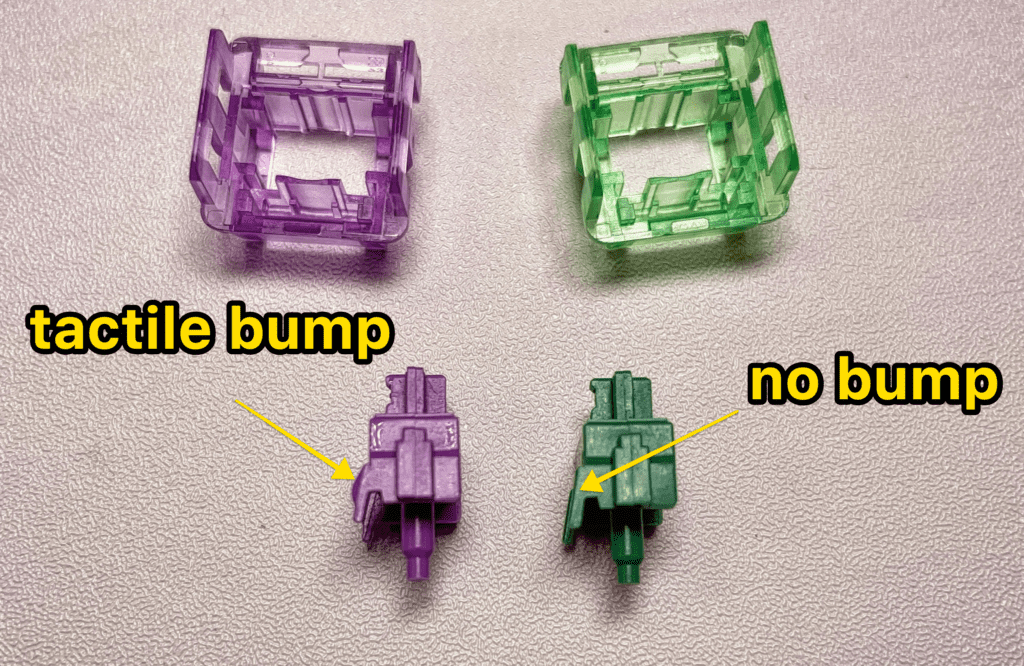
- Linear: The simplest type. The entire keypress is a straight, smooth path from the top to the bottom. There’s no tactile or auditory feedback when you press them, and they require the least amount of force to actuate.
- Tactile: These switches provide a tiny “bump” when you press them (generally around the actuation point). This “tactile feedback” helps your fingers feel when the key has actually been registered.
- Clicky: These are a sub-type of tactile switches. There’s the tiny bump, but with a small audible “click.” These are generally louder.
Want to see our recommended switches for those categories? See these posts 👇
To sum up: Linear switches are smooth all through the keypress! The only thing your fingers feel is the switch “bottoming out” at the very bottom of the keystroke.
Who Should Use Linear Switches?
Since they can be slightly faster and “easier” to activate, linear switches are often preferred by gamers, though they work just fine for typing and general use, too!
However, since your fingers aren’t offered the “physical feedback” to let them know that the key has been pressed, like tactile & clicky switches—linear switches might lead to more discomfort for long typing sessions.
Personally, I have found heavier linear switches to be slightly uncomfortable for typing/working (like the Gateron Milky Yellows or Ink Blacks). I’ve no finger pain issues with lighter linear switches (like the Akko CS Silvers or Cherry MX Reds). But this is MY experience!
The only way to find what works for you is to try some linear switches!
Should You Lube Linear Switches?
Yes, most linear switches really improve with a bit of light lubing (sound and feel). This is because “smooth” is the general feeling that linear switches offer anyways—and applying a good lube (like Krtox 205g or G Lube) will do 2 vital things:
- make linear switches even more smooth
- lower the sound (slightly more muted and lower-pitched “thocky”)
Lubing tactile (and clicky) switches is slightly more difficult (since you’ll want to avoid lubing the tactile bump!), and a bit of higher pitch and scratchiness isn’t quite as noticeable (and is actually preferred with some tactile switches).
Check out our full guide to lubing switches here.
Should you film linear switches?
Not necessarily. Adding switch films in between the top and bottom housing is really only necessary if the switches have a bit of wobble—so you should always check the switches for wobble first.
PRO TIP: What are switch films? Switch films are tiny, thin pieces of plastic (or other materials) that you can insert in between the top and bottom housing of your switches. This will help eliminate switch wobble, which can cause your keys to sound & feel “mushy” and “scratchy.”
Conclusion: Which linear switch should you buy?
If you’re a gamer looking for a competitive speed advantage, or you simply prefer the higher-end “tappy” sound of lighter linear switches, you should check out either the Akko CS Silver switches or the Cherry MX Speed Silver switches.
If you prefer a smoother, heavier feel and a deeper “thocky” sound, you should look at the Gateron Milky Yellows or Ink Blacks!
But honestly, I’ve tested ALL of the linear switches on this list, and can sincerely recommend every single switch!
Happy “thocking,” keyboard friends!
Linear Switch F.A.Q.s
Which are the best linear switches?
This will largely depend on the sound profile you prefer! If you prefer a lighter, “tappy” sound, I recommend the Akko CS Silver or standard Cherry MX Red switches. But if you prefer a deeper, “thockier” sound, I recommend the Gateron Milky Yellow, Gateron Ink Black, or Alpaca switches. These are all favorites of the Keeb Community!
Which linear switch is the best for gaming?
While all linear switches are great for gaming (smoother and generally faster than tactile switches), you’ll probably want a linear switch that has a lighter actuation force (resistance) and shorter travel distance. We recommend the Akko CS Silver or Cherry MX Silver switches! Both of these feature a pre-travel distance of around 1.1mm, which is quite fast.
What are the most Thocky switches?
If you’re looking for a deeper, lower-pitched “thock” from your mechanical switches, we recommend either the Gateron Milky Yellow, Gateron Ink Black V2, or Alpaca switches. All of these are on the heavier and smoother end of linear switches, and are community favorites in terms of “thock.”
What are the deepest-sounding linear switches?
If you’re looking for lower-pitched linear switches, you should check out the Gateron Ink Black V2 switches (or perhaps the Cherry MX Black switches). All of these are buttery smooth and heavy (60+ actuation force), and will result in a deep “thocky” sound.
Is linear or clicky better for gaming?
In a general sense, linear switches are going to be better for gaming. This is because they’re generally faster and smoother than tactile or clicky switches (which have a physical “tactile bump” during the keypress). There are several “speed switches,” such as the Akko CS Silver and Cherry MX Silver, which are designed specifically for gaming! However, there are also speed clicky switches, such as the Kailh Speed Gold switches, which offer some of the same advantages to linear switches (but with the small bump and click, of course).