The 8 Best Wireless Mechanical Keyboards (For 2023)

On This Page
Table of contents
On This Page
Table of contents
Do you know what STINKS?
Wires everywhere. Cables & Cords.
Desktop clutter.
*gasps
A wireless keyboard is definitely the way to go if you’re looking for more flexibility for your work (or gaming).
Plus, USB slots are valuable! 😎
As somebody who owns over 50+ mechanical keyboards (I know, #NerdAlert), but who also likes to work at coffee shops ☕ every now and then…
Here’s my list of the best wireless mechanical keyboards:
But as always, which keyboard you get will depend on the FEATURES you’re looking for!
Let’s dive into the details so you can find a great wireless ‘mech that works for you 😉
The Best Wireless Mechanical Keyboards for 2023:
I’ve broken these out by category to help you find what you’re looking for!
And just BELOW the ‘best of’ list, there’s a handy buying guide for what features you should be looking for.
Don’t miss that!
Best for Mac: Keychron K2
PROS ✅
- One of the only wireless split keyboards in the world
- A 75% TKL keyboard split (very rare)
- Cheaper than many split keyboards
- Genuine Cherry MX switch options!
CONS ❌
- Expensive
- A split keyboard isn’t for everybody
- A newer brand
An ergonomic keyboard is one where you can position your hands & arms in a much more natural, contoured way.
This can help with wrist and finger pain, but it can also yield more comfort, accuracy and typing speed!
And while most “ergonomic keyboards” are still one keyboard (but with a contoured curved layout), the Mistel is a “split keyboard,” which means the keyboard is in two pieces connected via a separate USB wire.
This allows you to PERFECTLY position the keyboard exactly where it needs to be!
Split keyboards are quite expensive, and almost always wired. The Mistel is easily the most available wireless split keyboard on the market—AND it offers four Cherry MX switch options!
- MX Red (linear)
- MX Silent Red (silent linear)
- MX Brown (tactile)
- MX Blue (clicky)
It’s the only wireless keyboard on our list to offer Cherry MX switches right out of the box.
Plus, the design is amazing.
And while Mistel isn’t an old-school, well-known keyboard brand, I believe that matters less and less these days, since even small companies have access to established manufacturers for their keyboards.
If you want a wireless keyboard that’s highly customizable and ergonomic, the Mistel Barocco is by FAR the best choice.
Wireless Keyboard Honorable Mentions
There are a few more keyboards worth mentioning:
Razer DeathStalker V2 Pro - An optical keyboard
The DeathStalker Pro is one of the most expensive keyboards that razor makes, but it’s also probably the most featured rich mechanical keyboard ever.
Scroll wheel? 100% full size or 80% TKL sizes available?
Bluetooth 5.0? Hyperspeed Wireless?
Scroll wheel and 100% customizable?
The DeathStalker Pro has all of the above.
The problem?
At over $250, it’s just too expensive. Especially since you only have two Razer switch options. The Razer BlackWidow V3 is far more affordable and has 80% of the features.
Keychron K8 Pro
More recently, Keith Krohn has been releasing more advanced keyboards and their normal layouts. These keyboards offer higher-quality keycaps, a higher-quality build, as well as QMK/Via support.
(Via is software that makes customizing your mechanical keyboard SUPER easy, giving you complete control over EVERYTHING. It works with only the best mechanical keyboards on the market).
The Keychron K8 is also one of the ONLY wireless keyboards to offer QMK/Via support in a budget-friendly price range!
With the Gateron G Pro switch selection, you’ll be getting one of the best feeling & sounding keyboards for the price range. Wireless or not!
Royal Kludge RK84 - Another Solid Budget Wireless
It’s well under $100, wireless, AND hot-swappable.
Also, the RK84 (and the larger RK87 size) also have a detachable side panel, giving two completely different looks!
The only downside to the RK84 is the scratchy, wobbly stabilizers (similar to other budget keyboards).
But overall, I’ve been quite pleased with my Royal Kludge keyboard! (I’ve also completely modded it out).
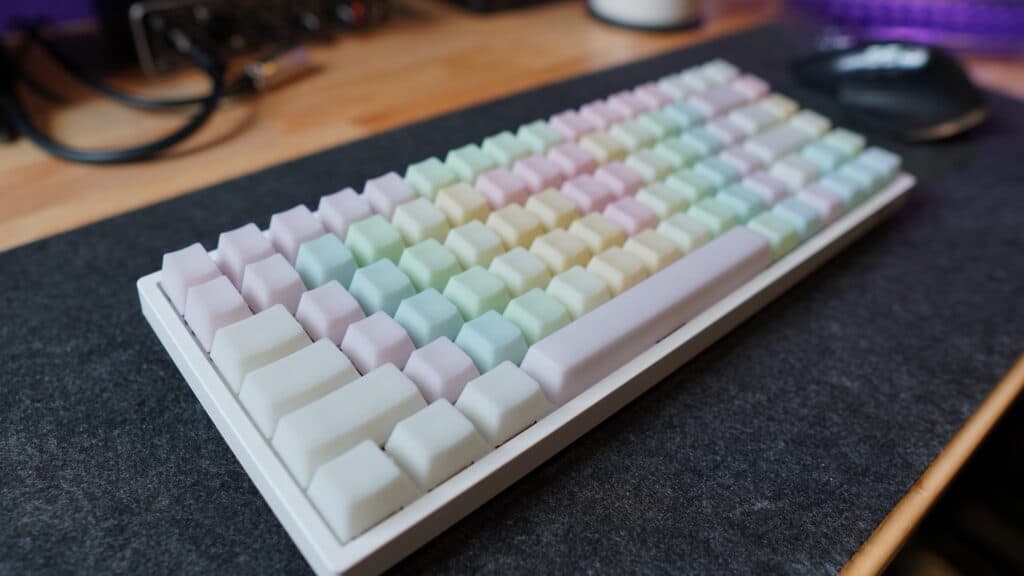 my RK84 with custom keycaps
Wireless Keyboard Buying Guide
When shopping for a mechanical keyboard of any type, here are the things you want to keep in mind:
Battery Life
5-10 years ago, wireless keyboards were WILDLY inconsistent with battery life, but that’s changed. Most wireless options use Bluetooth 5.0, and will last weeks (or MONTHS) on a single charge (depending on how much you use it). Check the product description for your keyboard. Anything over 50 hours is great (most are between 75 and 150 hours of use).
Connection Type
Most wireless keyboards use Bluetooth (4.0 or 5.0), but some might offer the ability to connect wirelessly via a 2.4ghz USB dongle (I don’t approve of the dongles! They’re inconsistent). Other fancier keyboards might also offer proprietary connections like HyperSpeed (Razer) or LightSpeed (Logitech) for low-latency connections.
Keyboard Size
Choose your keyboard size based on your needs! A 100% full-sized keyboard has the number pad, but also takes up a bunch of desk space. An 80% or 75% “TKL” keyboard chops off the number pad and is one of the most popular sizes. A 60% keyboard doesn’t have the numberpad, arrow keys, or the function row, but has “function key shortcuts” to access those keys.
Cost:
Obviously, you’ll want to set a budget and stick to it
Noise:
Most of the keyboards on our list can be customized to your preferred noise level, mostly through different switches (linear is softer, clicky is louder, tactile is medium).
Switch and customization options:
Many of these keyboards have different switch options to choose from, as well as different case colors or even keycap colors!
Build Quality:
This isn’t as much of an issue anymore, since most plastic keyboard cases are plenty sturdy (though you can find a lot of aluminum builds as well).
Ergonomic
If you work on a computer all day, it’s important to consider keyboard height, keycap height, and other ergonomic factors.
Fancier features
Do you need RGB backlighting? Or extra media or macro keys? Volume scroll wheel? These are tougher to find on wireless keyboards, but they’re out there!
The bottom line is to pick a keyboard that both makes you happy and suits your needs.
Don’t let the YouTube influencers convince you of a particular mechanical keyboard! Choose one that looks great to you and that will work with your situation.
That’s the best part about mechanical keyboards—there’s a TON to choose from!
Wireless Keyboard F.A.Q.s
Is there a wireless mechanical keyboard?
Yes. There are dozens of different mechanical keyboard brands on the market that offer wireless connections (like Bluetooth 5.0 or via a USB dongle). You can find budget wireless mechanical keyboards on Amazon like the Keychron K2 or Redragon K628—or you can find wireless versions of the popular keyboard brands like Logitech, Razer, and SteelSeries.
Which wireless keyboard is best for laptop?
Since there are hundreds of wireless keyboards to choose from these days, we recommend first choosing whether you’d like a normal “membrane” keyboard or a fancier-but-more-expensive mechanical keyboard. You’ll want to choose a wireless keyboard based on size (do you need a number pad? Or would you like a more compact size for traveling, like the 60% size?). Our go-to wireless keyboard for laptops is the Keychron K2, which pairs well with both Mac and Windows computers, and is the perfect balance of price and features.
Why are wireless mechanical keyboards so expensive?
Wireless keyboards require upgraded internal hardware components for either Bluetooth connections or USB dongles. This hardware costs more, and is also more expensive to manufacture, which leads to a more expensive keyboard.
Is Ducky keyboard wireless?
No. All Ducky keyboards are wired-only, including the Ducky One 2 and Ducky One 3. A similar 60% keyboard that is wireless would be the Anne Pro 2.