The 10 Best Hot Swappable Keyboards (for 2023)

On This Page
Table of contents
On This Page
Table of contents
When I bought my first mechanical keyboard, I had NO CLUE what “hot-swappable” meant.
I ended up with a loud keyboard with cheap blue clicky switches soldered on.
I won’t make that mistake again 😎
Ever since then, I try to buy hot-swappable keyboards. I’m obsessed with switches, owning 100+ sets—trying to find the perfect balance of sound & feel.
The great news?
There’s a metric ton of hot-swappable keyboards to choose from these days!
Here are my nominees for the best hot-swappable keyboards:
Down below, I’ll lay out my all-time favorites, and categorize them to help you find the best fit for what you want/need.
Let’s clack 👇
The Best Hot-Swappable Keyboards (List):
Note: There’s no “best overall!”
I truly don’t believe there is one single hot-swappable keyboard that’s head and shoulders above the rest—it all comes down to what YOU need, and that’s different for everybody!
Best Wireless - Epomaker Theory
You’ll find the Drop CTRL at the TOP of most people’s keyboard lists—but I think it’s absurdly overpriced for what you get.
It looks great, sounds and feels great, and also offers several unique switch options out of the box:
- Cherry MX switches
- Halo Clears or True (really popular in the mechanical keyboard community!)
- Kailh Box White or Speed silver
- etc
But it’s hot-swappable, so you could put those switches in ANY hot-swappable keyboard.
And at over $240, there’s simply not enough keyboard here for the price tag. You could grab a GMMK Pro at that price (including switches and keycaps).
If you absolutely do NOT want a custom or barebones kit, you might grab the Drop CTRL. It is a premium experience.
But it doesn’t get my recommendation. Sorry Drop!
What is a hot-swappable keyboard?
A hot-swappable keyboard is one where you can literally push in (and pull out) mechanical switches from your PCB—WITHOUT soldering.
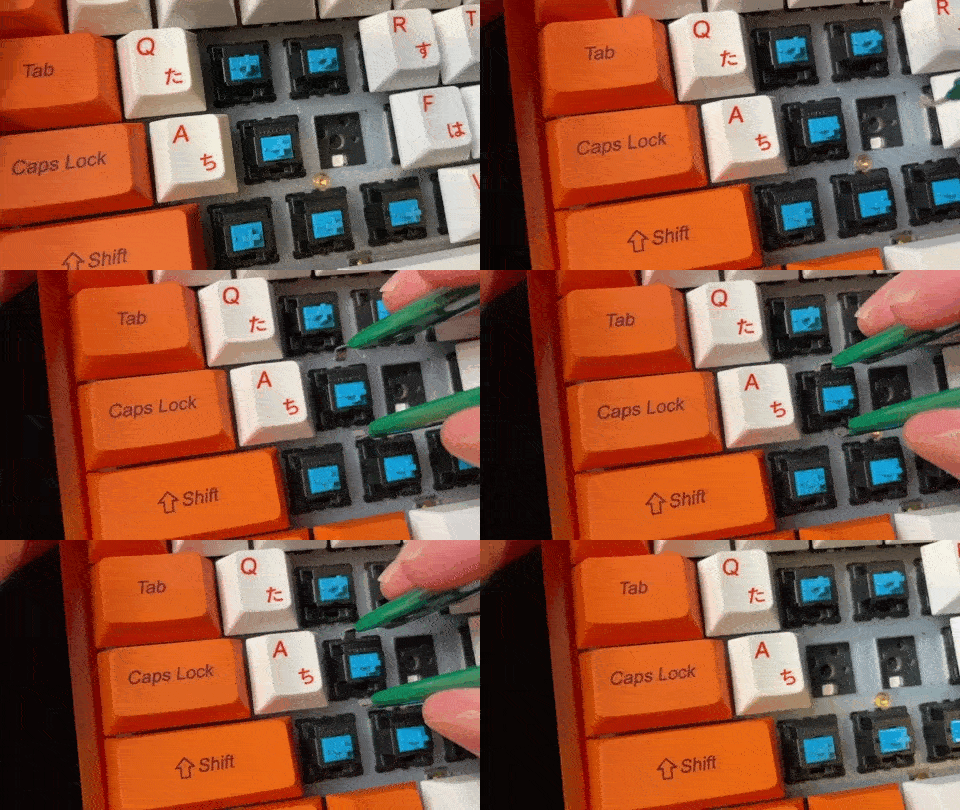
It’s incredibly easy and fast to change switches on hot-swappable keyboards.
On the other hand, a NON-hot-swappable keyboard means you will need a soldering iron and accessories in order to both install switches, as well as remove them.
Hot-swap F.A.Q.s
Can you put ANY switch in a hot-swappable keyboard?
No. You’ll need to make sure the switch is compatiable with your PCB. The most popular connection is “MX-style” mechanical switches, but there can be other connections (such as Outemu, which fit slightly differently into their sockets). It’s a good idea to double-check which type of switches your keyboard accepts.
How can you tell if a keyboard is hot-swappable?
The simplest and fastest way is to just try to remove a switch! Using a switch puller (or screwdrivers or your fingernails), gently try to remove the switch from the PCB/plate. It’s there’s any leeway (or the switch comes out), you have a hot-swappable keyboard. If it doesn’t budget at ALL, chances are it’s soldered in.
Are gaming keyboards always hot-swappable?
No. In fact, most gaming keyboards are NOT hot-swappable (especially from gaming brands like Razer, SteelSeries, or Corsair). If you’re purchasing a new keyboard, they will almost always describe themselves at “hot-swappable” or “swappable” if they are. If you already have your keyboard, you can try to remove your switches (gently), and if they come out easily, it’s hot-swappable. If not, the switches are likely soldered in.
How many times can you hotswap keyboard?
As many times as you like! Hot-swappable PCBs allow you to easily and quickly change out the switches, and there’s no limit to how many times you can do this. Just be gentle during this process so you don’t accidentally damage the keyboard or switch.
What is the best hot-swappable gaming keyboard?
The newer Corsair K70 Pro is my favorite gaming keyboard that offers hot-swap capabilities. It’s a functional 60% compact design that has all the standard gaming features, and will sound and feel fantastic. The wireless Redragon K530 is also a solid choice for gamers, and it’s a bit cheaper (though it doesn’t feel quite as premium as the K70 Pro).
Can you put a hot-swappable PCB in a normal mechanical keyboard?
This will depend on your keyboard. If you’re using a pre-built keyboard (especially from a big brand like Logitech, Razer, or Corsair), you probably will NOT be able to put in a new PCB that’s hot-swappable. That would also void the warranty. However, if you’re using a custom keyboard kit, you can usually search for compatitble PCBs (and they often make hot-swap versions)!