The Best Beginner Keyboard Switches: A Simple Guide

On This Page
Table of contents
On This Page
Table of contents
If you’re new to the world of mechanical keyboards, it’s easy to get overwhelmed!
There are THOUSANDS of keywords, switches, and accessories out there.
But have no fear! A nerdy keyboard veteran is here!
Here are the best beginner keyboard switches:
- Gateron Milky Yellow (Best budget linear)
- Akko Silver (Best linear for gaming)
- Cherry MX Clear (tactile switch)
- Glorious Panda (premium tactile switch)
- Kailh Box Pink (Best clicky switch)
- Kailh Speed Gold (best gaming clicky switch)
But what about Cherry MX Reds? Gateron Browns and Blues?
There’s a TON of beginner keyboard info out there—so below I’ll be walking you through the basics to help you make a buying decision (that’ll lead to the best possible mechanical keyboard experiment!!)
How to Choose a Mechanical Switch (Important Beginner Tip)
Here’s what I wish I knew when I first started in mechanical keyboards—no matter what, which switch you choose comes down to your personal preference (in terms of sound and feel)!
Don’t let experts (like me?) and YouTubers convince you that a switch is “the best,” even if you actually don’t care for it.
The bottom line: Get your hands on some switches (literally) to try out.
- Head to your local Best Buy or Microcenter
- Ask a friend with mechanical keyboards if you can come over
- Buy a “switch tester” kit (see below)
While you can and should start with some sound tests on YouTube to get a general idea of sound--the only way you can judge how a switch feels—is to type on them. That’s your #1 goal! To TRY OUT some switches BEFORE spending a lot of money.
Consider purchasing a switch tester.
A switch tester is a pre-made kit that features multiple different types of switches that you can test out. These will cost a bit of money (between $10-75), but it can be a useful (and fun!) way to experiment with how switches sound and feel.
Some switch tester favorites of ours:
What Is a Mechanical Switch?
A keyboard “switch” is the physical mechanism that lies just underneath your keycaps (the top part that your fingers make contact with), and plugs into the PCB (circuit board in your keyboard case).
The switch compresses down when you press a key, then moves back up when you release pressure.
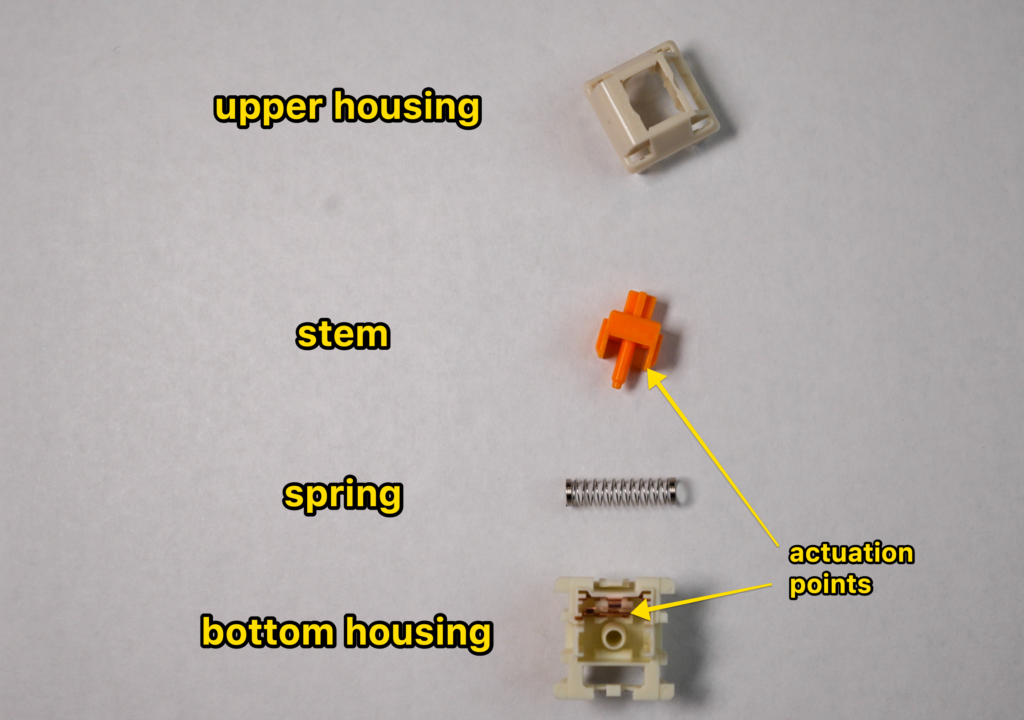
Let’s break down the parts switch (from top to bottom):
- Keycaps (not actually part of the switch): The keycaps are the part of the switch that you actually touch. They’re usually made from ABS or PBT plastic, and come in tons of different colors & styles! (and shapes and profiles)
- Switch stem: This is the part of the switch that extends down into the switch and moves up and down when you press the keycap (it’s connected to the underside of the keycap). The stem is generally colored to match the switch color. I.e. green switches usually have green stems. Tactile & clicky switches have a small bump on their stems! Linear switches do not.
- Upper housing: This is the part of the switch that contains the spring and rests on top of the lower housing. It has a hole in the center for the stem to fit into (the upper and bottom housings snap together, and you need a “switch opener” tool to take them apart. Or a flathead screwdriver, but that’s harder).
- Spring: This is what provides the resistance when you press a key down, and also gives it that “bouncing” feeling.
Lower housing: The bottom half of the switch “shell” or “box.”
Normal keyboards (i.e. “membrane keyboards”) don’t have mechanical switches, but rather a thin rubber membrane with fewer moving parts (which is cheaper, but doesn’t feel or sound like mechanical switches)!
Linear vs Tactile vs Clicky: What’s the difference?
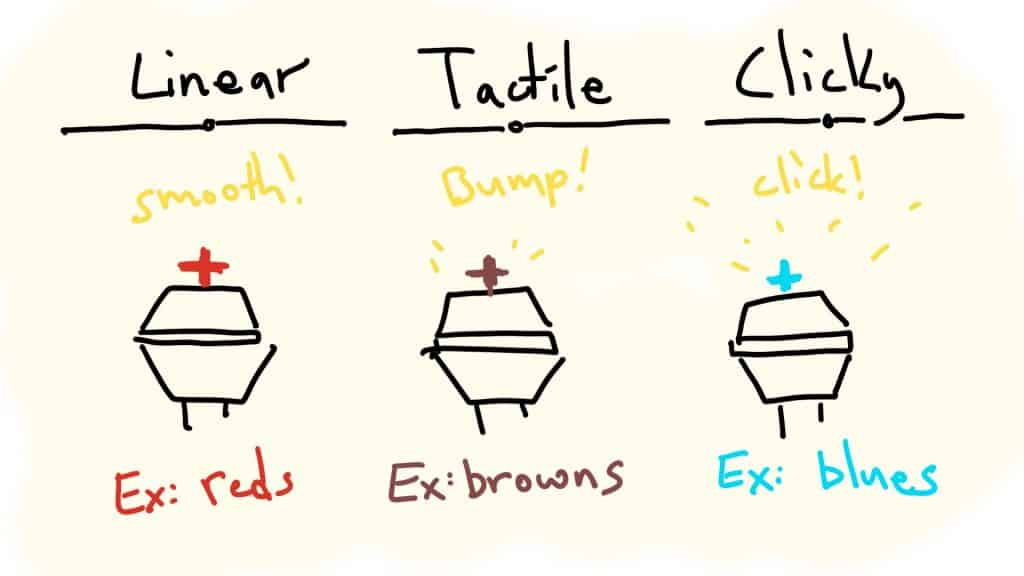
Broadly speaking, there are 3 different types of switches:
- Linear: The simplest type. Pressing them is a straight, smooth path from the top to the bottom. There’s no tactile or auditory feedback when you press them, and they require the least amount of force to actuate.
- Tactile: These switches provide a tiny “bump” when you press them (generally around the actuation point). This “tactile feedback” helps your fingers feel when the key has actually been registered.
- Clicky: These are a sub-type of tactile switches. There’s the tiny bump, but with a small audible “click.” These are generally louder.
Most beginners start off with tactile switches, as they will generally offer the easiest transition (in terms of sound and typing comfort) into the world of mechanical keyboards.
Clicky switches are fun but can be a bit too noisy. Linear switches are still fantastic, but they feel different and might require some getting used to (and if you spend a lot of time typing, it’s best to stick with a tactile or clicky switch).
The Best Beginner Keyboard Switches
Below are the switches we can recommend to beginner keyboard nerds! These will mostly be in the lower price range (so you can try them out before you understand what you really like).
We’ll recommend some based on category (linear, tactile, clicky), as well as different switches based on how you use your keyboard (typing, gaming, office vs home, etc):
Gateron Milky Yellow (Linear) - Budget, smooth, and thocky
Click mechanism
Click jacket (normal clicky switch)
Actuation Force
50g (but a shorter 1.4mm actuation distance)
Sound
Muted and “crackly”
Feel
Medium, normal (not in a bad way), MAYBE a bit faster and lighter
The Kailh Speed Gold switches click via a “normal” click jacket, and only on key press (not on release).
But the Speed Gold has different characteristics that are great for gaming (and honestly anyone).
- They’re more muted (less loud and annoying)
- They’re technically a “speed switch,” which basically means the switch travels a fraction of a millimeter SHORTER to activate the switch.
Most switches have an activation distance of 1.8mm - 2.0mm. The Kailh Box Gold only travel 1.4mm to activate the key.
Kailh Speed Gold sound test
To be honest, most people can’t tell a huge difference in “speed” switches, for gaming or otherwise.
But the Kailh gold switches sound nice (crackly and muted), and feel pretty light! They’re a fun clicky switch to game or type on—and won’t be too uncomfortable for work/typing.
Honorable Mention: Gateron Green switches
Just like the clear tactiles are usually heavier than the brown tactiles—the greens are usually heavier than blues.
Switch
Operating Force
Notes
65g
high-pitch click, tappy sound
80g
click is the same, but a tad bit deeper and heavier
50g
VERY high-pitch click. love it or hate it.
80g
click is less noticeable. Heavier feel.
Out of the Blue and Green switches, the Gateron Greens get my official recommendation.
- They’re clicky
- They’re heavier and feel better
- They’re SUPER affordable ($0.25 per switch or so)
They also sell “milky” green switches as well, which have a different material for the housings!
What Makes a Good Beginner Switch? (A Buying Guide)
A “beginner” switch should be one that’s…
- Affordable
- Easy to type on AND game on
- Easy to find (and doesn’t require a 1-yr wait to receive them!)
- Sound decent stock (unlubed and unfilmed—though obviously a light lubing will improve almost all of these switches!)
I’ve tried to recommend switches in this article that fit (most) of those factors—but remember, the best switch is the one that works for YOU, and the only way to discover that is to try them!
Conclusion: What Are the Best Switches for Beginners?
Here are some fantastic switches, broken down by how you use your keyboard:
- If you’re a gamer and looking for a lighter and faster switch, try the Akko CS Silvers (Linear), or the Kailh Speed Copper (Tactile)
- If you primarily type or work, stick to tactile switches like the Glorious Pandas (Tactile, crisp) or Cherry MX Clear (Tactile, heavier).
- If you want something louder (but not annoying) and clicky, try the Kailh Box Pinks (Clicky)
Also, you should consider purchasing a switch tester that will allow you to test and try several switches before committing to a purchase! This is the easiest way to actually experience what the switches will sound and feel like!
Happy clacking (or clicking) my friends!
Beginner Switch F.A.Q.s
What switches are best for typing?
Generally, tactile switches are considered the best for typing. They provide “tactile feedback” to your fingers that lets you know when a keypress has been registered. This usually means more comfort and less finger strain over long periods of time. Some popular tactile switches include Cherry MX Brown (medium resistance), Cherry MX Clear (heavier), Glorious Pandas (sharper tactile bump). You can also consider using clicky switches (which also have a tactile bump) like “blue” or “green” switches, though some people don’t enjoy the addition of an audible “click.”
Are brown switches good for beginners?
Yes, brown switches (like the Cherry MX Brown) are often recommended as a great switch for beginners. As opposed to linear switches, which can be a slight adjustment for your fingers to type and game on, tactile switches (like Browns) offer a small “bump” that lets you know when a keypress has been registered. This can help with comfort and accuracy, especially if you’re just starting out with mechanical keyboards. Also, brown switches are generally lighter than clear switches (Cherry MX Clear or Gateron Clear), which are easier to type on if you’re used to a “normal” membrane keyboard.
What switches are the easiest to press?
Generally speaking, linear switches (like Cherry MX Red, Black, Yellow, etc Red) are the easiest to press, since there is no resistance until the key is fully pressed down. This can be helpful for gamers who need to press keys quickly and don’t want their fingers to get fatigued. However, some people find linear switches more difficult to type on since there is no feedback (especially for longer work sessions). You can also choose switches with a lighter “operating force,” meaning they require less force to activate. Speed switches, red switches (linear), brown switches (tactile), and blue switches (clicky) are generally lighter than blacks, clears, and greens.
Are brown switches quieter than red?
Generally, no. Browns switches are a tactile switch that offers a small “bump” when the key is activated, while reds are a linear switch that offers no resistance until the key is fully pressed. Linear switches will usually be quieter (but not always). This will depend on the specific brown and red switches you’re comparing, but reds will usually be quieter.