9 Best Mechanical Keyboards for Programming (2023)

On This Page
Table of contents
On This Page
Table of contents
Debugging your messy Python code but still want to click and clack?
These are my recommendations for the best mechanical keyboard for programming (updated for 2023).
As a former dev myself—I can honestly say that upgrading keyboards absolutely changed my work and my life!
But there are also some important things to consider (like not driving your coworkers insane with your uber-loud clacking 🤦♂️—or getting a keyboard that LOOKS great—but doesn’t have the features you need to code productively).
I’ve found the following keyboards to be the best overall for programmers & developers:
How I test & recommend keyboards:
There are a few basic factors I look for:
- Size & layout (this is an important one for developers)
- Comfort & Ergonomics (same if you code more than an hour or two a day!)
- Portability
- Macros and/or programmable keys
- Wired vs Wireless
- Options like different switch options, RGB backlighting, keycap options, etc.
For programmers/developers, it’s important to have a keyboard that is COMFORTABLE for long periods of use (your job is on your keyboard!), as well as making sure you have the right SIZE keyboard for your specific work (I find it hard to do my work on a 60% compact keyboard, but a TKL (80% or 75%) is perfect.
Corsair K95 (or K100) - Best overall
The BlackWidow Elite is another fancy-pants keyboard that packs in some extra features:
- Magnetic wrist rest
- Multi-functional media buttons and knobs
- A pass-through USB port
- An audio pass-through port
While I’m personally not a big fan of Razor’s proprietary switches (just gimme plain old Cherry or Gateron options, please), I DO like USB pass-throughs.
Check out our full guide to mechanical switch colors here!
It’s one of those keyboard features that doesn’t sound that interesting until you find a good use for it—then OMG it’s nice. For me, I built a custom macro pad (for streaming and extra media knobs) that I like to plug into the USB pass-through ports to save cable space.
Handy!
PROS ✅
CONS ❌
Extra media knob and buttons
Wired only
Full RGB
Not hot-swappable
Detachable wrist rest
I personally don’t like Razor switches
USB pass-through and audio pass-through ports(!)
Programmer keyboard honorable mentions:
The following keyboards are ones I have ZERO direct experience with, but I’ve seen mentioned in a ton of places:
This hard-to-find keyboard offers integrated display keys! One of the only keyboards that does that. It also has some decent switch options and is hot-swappable.
It runs around $250ish, and is wired-only. (you might be able to find it on Amazon here, else check the link above)
I have typed on this one before, and it’s legit! It’s not wireless or hot-swappable, but it has plenty of other bells and whistles, including a volume knob, media keys, TWO USB pass-through ports, etc.
I’m a big fan of Das Keyboards in general.
I had no clue that EVGA even made keyboards, but apparently, they do. This looks REALLLLY similar to the Corsair keyboards above, but it’s hot-swappable!
It’s wired only but has all the other standards, including
- RGB
- Size options
- Kailh switch options
- N-key rollover
- Detachable wrist rest
The Drop keyboards are expensive, but shiny!
The Drop Alt is a 65% layout (with arrow keys and some home cluster keys), and has side lighting in addition to full RGB! It has an upgraded aluminum frame (as opposed to plastic frames in budget boards), and is quite heavy.
It’s definitely a well-built machine with decent features, but I’ve personally felt “meh” at this price point.
Drop keyboards also work on Mac and support customization through Via!
Mechanical Keyboard Buying Guide for Developers
You might have gathered this much already, but there are few specific features that programmers need to be aware of—in addition to the usual stuff to look out for:
Size and Layout
While you might save desk space with a compact 60% layout, you might be limiting productivity in your work without the numpad, function row, and/or home keys!
For me, I don’t use the numpad or function row, but I DO like my arrow keys and home cluster.
I prefer a 68%, 75%, or 80% TKL size.
Comfort and Ergonomics
Arthritis, wrist pain, and finger fatigue is no joke! Especially if you spend all day at your computer for work (and play? I know y’all game, too).
In addition to researching ergonomic keyboards, like the split keyboard Kinesis above, also pay attention to the height of mechanical keyboards.
If you’re used to a low-profile keyboard, you’re likely better off searching for a low-profile mechanical. Mechanical switches are taller by design than typical membrane keyboards, and they can be a stretch if you’re not used to it.
Will it work in your office?
If you DO work in an office—is it quiet enough not to pester coworkers or offend would-be clients with crazy RGB colors?
Related reading: Are mechanical keyboards good for office work?
Portability & Size
If you travel with your keyboard at all (whether you’re a digital nomad, work out of coffee shops, or simply take your keyboard to meetings around your office), you’ll probably want to stick with a wireless mechanical keyboard.
That, and you might prefer a more compact layout like a 60% or 80% board.
Programmable keys and/or macro keys
While the normal human population probably doesn’t need these at all—developers and gamers are often searching for shortcuts—in terms of typing or coding!
Having extra macro keys can be handy for code syntax, recording software macros, etc.
Switch Options
Mechanical keyboard “switches” are the mechanical devices just underneath the keycaps that you press down. When you press down, a “stem” travels down (with resistance from a tiny spring) and activates the keystroke to the motherboard (i.e. PCB).
And they make tons of different types of switches!
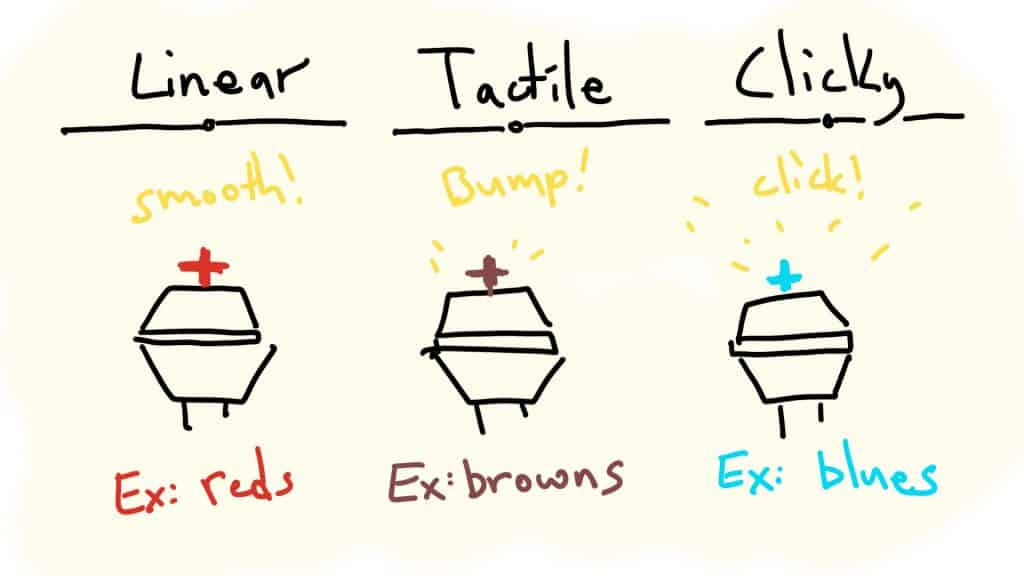
- Linear switches (common colors include Red, Black, Yellow) are smoother and softer (and a fraction of a millisecond faster)
- Tactile switches (Brown, Clear) have a tiny “bump” you can feel when the key is actually activated.
- Clicky switches (Blue, green) are tactile switches, but with a small “click” noise on the keystroke
See below for some switch recommendations for programmers.
Backlighting and RGB
Do you want a fancy light show from underneath your keycaps? Do you want to customize the colors, patterns, etc?
RGB is pretty common among mechanical keyboards these days, and you can always turn it off if you’d prefer!
Mechanical Keyboards for Programming F.A.Q.
Which mechanical keyboard is best for programming?
Though it will depend on your specific needs, you’ll probably want to grab a keyboard built for accuracy and comfort. Since you literally work and play on your computer, you’ll be spending a lot of time on the keyboard, so it’s vital you consider ergonomics (both the layout of the keyboard, as well as the height).
Developers might also enjoy extra macro and media keys that they can customize, leading to more productivity.
We recommend the Corsair K95 as our top pick for programmers, but the Tecware Phatom and Anne Pro 2 are excellent choices as well.
Should Coders Use Mechanical Keyboards?
Since coders spend a LOT of time on a keyboard, a mechanical keyboard brings two main benefits: improved typing & coding speeds (and accuracy), as well as improved ergonomics.
If your main job revolves around your keyboard, you’ll want to choose an instrument that reduces wrist and finger fatigue and helps you stay productive.
And aside from that, it’s also important to enjoy your work whenever you can, and a highly customizable mechanical keyboard can certain be a lot of fun!
Are 60% keyboards good for programmers?
As long as you don’t need the tenkey numpad, function row, and dedicated arrow keys, a 60 percent keyboard should be perfectly fine (and even free up some desk space)!
The Anne Pro 2 is one of the more popular compact 60% keyboards we recommend.
Programmers might also consider a 65% (or 68%) mechanical keyboard, since it’s roughly the same size and layout, but with dedicated arrow keys and the “home,” “delete,” “Page Up,” and “Page Down” keys!
What Are the Best Switches for Programming?
From the three main categories of mechanical switches (Linear, Tactile, and Clicky), programmers should probably choose either Linear or Tactile switches.
Clicky switches are generally louder and could annoy coworkers (or even the other coffee shop patrons!)
If you do any gaming on the side, linear switches are your best bet. They’re generally the smoothest, softest, and fastest (but only but a tiny margin). Some of my favorites are Cherry MX Reds, Gateron Ink Blacks, or Gateron Milky Yellows.
However, tactile switches are generally preferred by anybody who does a large amount of typing (including anybody who codes), due to their tactile feedback. This can mean more accuracy and faster typing speeds.
Is the Magic Keyboard Good for Programming?
If you work on a Mac, you’re probably used to the low-profile action of the Magic Keyboard. However, the Magic Keyboard is lacking on some common features that programmers find useful in mechanical keyboards.
The Magic Keyboard doesn’t have any programmable keys or extra macro keys, and most programmers will likely find coding on a mechanical keyboard to be a bit faster and more accurate (especially with tactile mechanical switches that give feedback to your fingers)!
The best news? There are several low-profile mechanical keyboards that work great with Macs, like the Keychron K7. It won’t be a hard transition from the Magic Keyboard, and still yield plenty of awesome benefits of a mechanical keyboard.