The 10 Best Mechanical Keyboards Under $100 (for 2023)

On This Page
Table of contents
On This Page
Table of contents
On a budget? No problem! 💰
There are amazing mechanical keyboards you can pick up for under $100, without sacrificing a good sound and feel.
In fact, out of the 30+ keyboards I own, over 75% of them are BUDGET keyboards.
But there are some “duds” that aren’t worth it—so keep reading.
Here are our top picks for the best mechanical keyboards under $100:
Let’s get into it.
How we rank our budget keyboards:
There are a few common features that we like to look for:
Cost:
Obviously, we’ll look at the price tags of these keyboards and make sure they’re under the $100 range.
Wireless:
Do you need your keyboard to be wireless? Or do you prefer the wired connection?
Hot-swappable:
Hot-swappable keyboards allow you to easily change the switches without de-soldering (which makes it more convenient to make customizations.)
Switch and customization options:
Many of these keyboards have different switch options to choose from, as well as different case colors or even keycap colors!
Build Quality:
We’ll check to make sure the overall build quality is good and that there aren’t any obvious “cheap stuff.”
Best Mechanical Keyboard Under $100
Now that you have an understanding of how we are judging these keyboards, let’s dive into our favorite recommendations.
Keychron K2 - Best Overall (and Best for Mac)
- Cost: ✅ $80
- Wireless? ✅ Yes
- Hot-swappable? ✅ Yes
- Customization Options: ✅ a few
I mean, as far as gaming keyboards go, you might NOT need 2 features I’ve brought up a lot:
- wireless Bluetooth capabilities
- the ability to hot-swap in mechanical switches.
And while the Keychron K2 recommendation has both of these (and more), there’s another low-budget pick in the RK84.
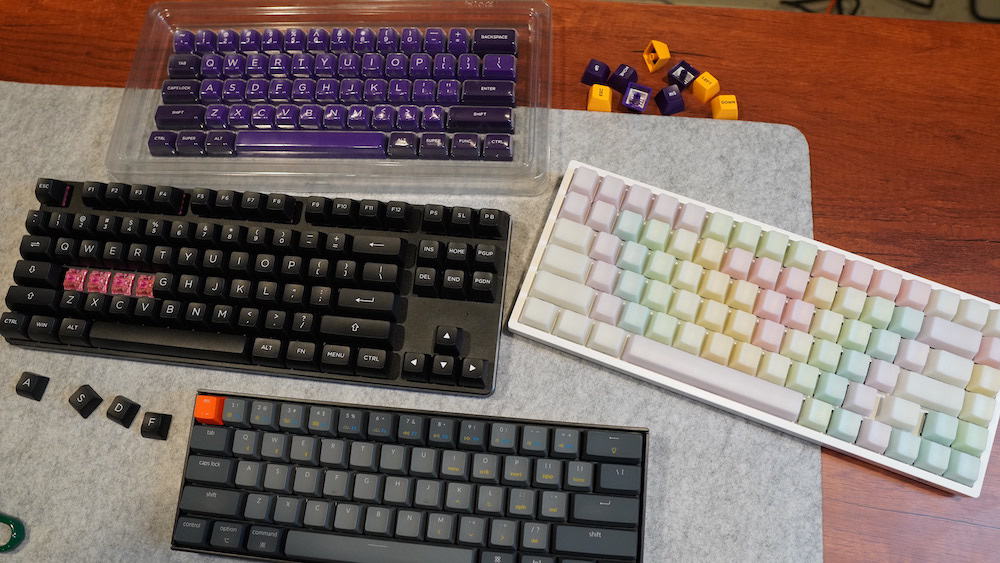 my RK84 on the right! I put POM Jelly keycaps on there
And they also have different sizes, all of which are wireless and hot-swappable!
The reason the Royal Kludge keyboards aren’t higher up on our list?
- Build quality feels a bit cheap
- The stock RK switches are NOT the best
- The RGB lighting feels a bit off (from a color perspective. It’s not BAD. Just feels a bit more “saturated”)
Specifically, the stabilizers (under the space bar, enter key, backspace key, etc), are a bit wobbly and scratchy.
But overall, there are ton of features for being a $50-80 keyboard!
Related Reading: The 5 Best Budget Keyboard Switches (Cheap But Awesome)
Conclusion: Should you get a keyboard under $100?
Absolutely! Just because a keyboard doesn’t cost $250+, doesn’t mean it can’t be great.
As long as you do a bit of research to figure out which FEATURES you absolutely need and want, you should have no problem finding a fantastic keyboard under $100.
Our favorites are:
- The Keychron K2 - It’s wireless keyboard that’s hot-swappable and built like a truck!
- The Durgod Taurus K320 - It feels like a premium keyboard (though it does lack a few features)
- The Tecware Phantom - A fantastic gaming keyboard under $50!
By the way, click here to check out our best keyboards under $50, if you want to stay even cheaper.
Budget Keyboard F.A.Q.s.
Let’s explore some frequently asked questions!
What is the best mechanical keyboard for gaming under 100?
If you’re a gamer who needs to stay on a budget, we recommend the Durgod Taurus K320 (because of the premium feel and build quality), or the SteelSeries Apex 5 (because of the extra media and macro keys, as well as an OLED Smart Display right on the keyboard).
What is the best $100 keyboard?
Overall, we recommend the Keychron K2. It has an incredible feature set for the price, including hot-swappable mechanical switches, wireless and wired connectivity, Mac and Windows layout options, and solid build quality. And it comes in at just under $90!
What is the best 60 percent keyboard under 100 dollars?
There are two budget compact keyboards that we recommend: The Anne Pro 2 (because it’s packed with features and fully programmable) and the Keychron K7 (it’s a great low-profile option that still offers switch options).
What is the smoothest mechanical keyboard?
Really, the “smoothness” of a keyboard comes down to several factors, including what switches are being used, as well as the keycaps and case build. Overall, any mechanical keyboard that comes with LINEAR switches will be smoother (as opposed to tactile or clicky switches).
And if you want an even SMOOTHER experience, look for keyboards that are gasket-mounted, or that have foam installed in the case.