Best Mechanical Keyboard Under $50 (9 Budget Picks for 2023)

On This Page
Table of contents
On This Page
Table of contents
On a budget—but wanna click, clack, and thock?
Good news! There are several GREAT budget-friendly keyboards! ⌨️
I’ve personally typed on dozens of budget mechanical keyboards, and I have 7-9 different options for the best mechanical keyboard under $50.
Here are my top recommendations:
BUT, my recommendation depends on what you plan on using it for—so read on!
I’ll help you figure out the best fit for you—and your wallet.
How do we rate our keyboards?
Whenever we review mechanical keyboards, there are always a few things that we look for…
- Cost - We will make sure that each of these mechanical keyboards is under $50.
- Wireless - Can you connect the keyboard via Bluetooth, or does it have to be wired?
- Backlighting - We’ll check each keyboard for its RGB features
- Hot-swappable - Can you easily remove the switches WITHOUT de-soldering and taking apart the entire keyboard?
- Durability - Most budget mechanical keyboards have plastic cases, and will be made with cheaper materials. However, some might have aluminum cases, etc.
That said, let’s check out some of the best mechanical keyboards under $50.
Tecware Phantom 104 - Best Overall Under $50
Even though the title says this is a 60% keyboard, it’s actually more like a 65% layout!
It has some “home cluster” keys on the right side of the keyboard, including page up, page down, home, delete, arrow keys, etc.
And oh yeah, not only does it have full RGB, but it also has side lighting! (the only budget keyboard on our list that has that).
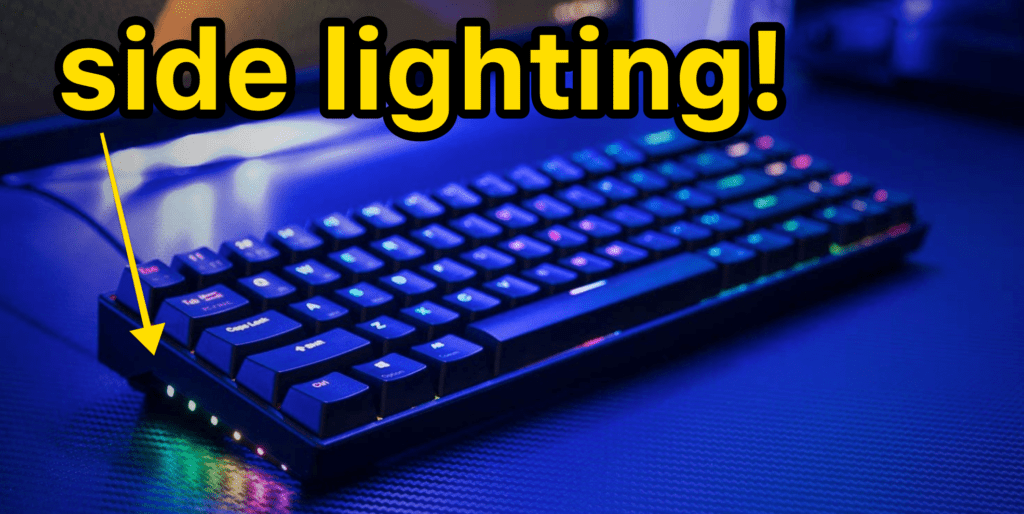 The [Drevo Calibur V2](https://www.amazon.com/DREVO-Calibur-Mechanical-Keyboard-Detachable/dp/B07QYVKC2Y?crid=1RG430MUXC0N9&keywords=Drevo+Calibur+V2&qid=1645581431&sprefix=drevo+calibur+v2%2Caps%2C105&sr=8-2&geniuslink=true&linkCode=ll1&tag=keeb-20&linkId=6fa61d22b7ec79ea66963bce41ad590c&language=en_US&ref=asli_ss_tl)
Fancy!
And if you really need wireless, there’s one for a few bucks more (The Drevo Calibur V2 MAX)
Honestly? If this budget keyboard had a hot-swappable option, it would probably take our top spot even though it’s only a 65% layout.
✅ PROS
❌ CONS
Great price for a 65% keyboard!
Wired only (but there’s a wireless version for $15-20 more)!
SIDE LIGHTING! (in addition to full RGB backlighting)
Not hot-swappable (like most of the other keyboards on this list)
Great minimal design
Different switch and case color (black, white) options
Want to modify one of these budget mechanical keyboards so they sound even better?
Believe it or not, there are some simple and cheap modifications you can do to a cheap mechanical keyboard to drastically improve the sound and feel of your mechanical keyboard.
For any hot-swappable keyboard, add some upgraded switches!
Not many of the sub $50 keyboards or hot-swappable, but switches can make a huge difference. Most of the budget mechanical keyboards come with off-brand switches, or MAYBE stock Gaterons or Outemu switches (which are cheap).
Click here to see our recommendations for the best budget keyboard switches!
Add some foam to your keyboard case, i.e. “the foam mod.”
If you don’t mind taking apart your keyboard (which isn’t that hard most of the time!), you could insert some cheap foam to dampen the sound and also make the keyboard heavier. It’s fun, worth it, and usually isn’t that hard!
Check out our full guide on how to foam mod a mechanical keyboard here.
Lube your switches (and/or stabilizers!)
For budget keyboards, this might be a little bit more involved than most beginners are willing to go, but it’s still worth mentioning.
If you have a hot-swappable keyboard, this will obviously be a little bit easier. Simply take out your switches and lube them!
Click here to see our guide on lubing switches!
But even if your budget board doesn’t have hot-swappable options, there are other ways to lube switches without de-soldering. See the guide above for more info there.
Budget Mechanical Keyboard FAQs:
What is the best affordable 60% keyboard?
The Drevo Calibur V2 is the best 60% budget keyboard, hands down!
The caliber has a fantastic mix of features, including different switch options, wireless capabilities for a few dollars extra, etc.
It also has a great minimal design (with full RGB backlighting and side lighting!), and the durability is solid.
Click here to view our recommendations for the best 60% keyboards.
What is the best mechanical keyboard for its price?
The real answer to this depends on your price range!
If you are looking for a fantastic budget keyboard under $50, our recommendation is the Tecware Phantom 104 (a 100% full-sized mechanical keyboard).
It’s the only sub-$50 keyboard that is hot-swappable! And of course, it has all the other features you might want including full RGB backlighting, n-Key rollover, and more.
There’s also an 80% TKL size Phantom as well!
Conclusion: There are plenty of great keyboards under $50!
Do NOT be fooled! Cheap mechanical keyboards aren’t necessarily terrible! There are plenty of options that are wireless, have full RGB backlighting, a decent selection of case colors and switch types, and even hot-swap capability.
We recommend
- The Tecware Phantom for just about anybody!
- The Drevo Calibur V2 if you’d prefer a compact 60% layout (with side lighting!)
- The Redragon K552 for the absolutely cheapest you can get
- The Havit TKL version with different keycap options.
Generally speaking, you will be giving up a little bit of durability and features for these budget-friendly keyboards, but that doesn’t mean they still won’t work for you! Budgets are important, after all.
Happy clacking ;)
RELATED: Check out our best mechanical keyboards for Mac users!