The 10 Best Silent Mechanical Keyboards (In 2023)

On This Page
Table of contents
On This Page
Table of contents
Yes, a mechanical keyboard will upgrade your typing & gaming experience…but are they sometimes a little too loud and clacky? Also yes.
Today I’m sharing my best silent mechanical keyboard option based on what you’ll use it for!
I’ve taken these into coffee shops and NOT gotten dirty looks—so they must be legit ;)
Here are our recommended quiet mechanical keyboards:
BUT ALSO…there are easy modifications you can do for ANY mechanical keyboard to make it quieter!
I’ll share those below, too. 😎
What makes a keyboard silent? (Important Note)
While some keyboards are NATURALLY louder than others, there are several factors that go into keyboard noise:
Switches
The mechanical switches underneath the keys. There are 3 broad types of keyboard switches:
- Linear: These are the softest! Nice and smooth.
- Tactile: These are slightly louder and clackier, and have a tactile “bump” when you press the key down
- Clicky: This is the loudest of all! You can also feel a slight “bump,” but this time with a small audible “click” noise.
Check our our recommendations for the best silent switches here.
If you’re looking for quiet mechanical keyboard, find a keyboard with linear switches (Cherry MX reds, Cherry MX Blacks, Gateron Milky Yellows, etc).
Also, they make “silent switches” as well. These are constructed differently and are intentionally even MORE quiet.
Keyboard modifications
Even if your keyboard is uber-loud, there are some simple mods you can do to soften the sound.
Stabilizers
Metal rods underneath your space bar, shift key, enter key, and backspace key (the large keys that need stabilizing). These make additional noise, but there are some simple modifications you can do to stabilizers (discussed below)
Keyboard case
Some keyboards are more hollow, and therefore more resonant (and louder). Others come with some foam lining already inside of the case, muting the sound. Foam in the case = softer Gasket mounted = softer
Your desk
Yes, even your desk can make your keyboard louder. If you’re looking for a keyboard to use at work, and want to be extra discreet, consider using a desk mat (or extra-large mouse pad). These can easily be found on Amazon, and they’ll reduce the overall noise when typing on your mechanical keyboard.
We’ll talk about these at the end of this post, but you can check out our full guide to keyboard mods here.
The Best Silent Mechanical Keyboards
Now that you know a bit more about what to look for in a keyboard, and what affects the sound, let’s dive into my personal recommendations based on what you’ll be using it for:
Best Overall: Corsair Strafe RGB MK.2
PROS ✅
- Split keyboard design for better ergonomics
- A decent price for that type of keyboard
- Silent Cherry switch options
CONS ❌
- Still expensive
- Split ergonomics isn’t for everybody.
Out of all the “split” keyboards you can find, $150-180 is actually on the cheaper side.
And the Kinesis Freestyle is one of the more popular ergonomic mechs out there—complete with Cherry MX Silent switch options!
It’s completely programmable, has different user profiles, and even a 2 year manufacturer’s warranty (this isn’t normal for mechanical keyboards). So if something happens in 2 years, send it back!
Silent Mechanical Keyboard notable mentions:
While these don’t make my personally recommend keyboards, they’re still great and CAN be quiet enough (depends on the switches you put in, etc). They’re worth checking out!
Yes, it’s the same “Cherry” brand that makes Cherry switches! This is the full-sized G80.
These Cherry keyboards definitely have an old-school look, but I kinda like it. And did I mention that they come with different switch options, including Cherry Silent Blacks?
That thing will definitely be silent.
I wanted to recommend the EP84 for a few reasons.
- It’s an extremely popular keyboard in general. Sounds great feels great.
- Hot-swappable
- Color options
- Several linear switch options.
You can pick this up with Gateron Reds, Blacks, or Yellows (all softer linear switches). Handy!
If you’re looking for a solid 80% TKL layout with a SIMPLE design (super minimal black), that offers Cherry MX Silent switch options, the Majestouch 2 is a great buy.
It’s a tad pricey ($130ish), but that old-school black boxy design looks slick.
Silent Keyboard Buying Guide
Here are some of the top factors you want to consider when shopping around for a quiet keyboard:
Switches
“Silent” switches will be best, but otherwise, just stick to linear switches. They’re smoother and generally less noisy.
Cost
Obviously, the more you pay, the better the build quality, materials, etc. Try to get a decent keyboard instead of a cheap one—but there are great keyboards under $100!
Layout/Size
Do you need your number keys? Then you probably want a full-size keyboard. If you don’t mind missing the numpad, then go for a TKL (tenkeyless) or smaller layout. (60% compacts are easy to find, as are 80% and 75% TKLs.)
Wireless/Wired
Personally, I don’t mind having cords (and you can even purchase pretty colored cables!). But you prefer wireless, check the keyboard for Bluetooth, etc.
Design - will it work, at your work?
If you plan on using your keyboard in your office, does it fit the design of your office? I.e. more subdued black or grey? Or can you hype all your coworkers with your RGB backlighting?
Comfort and ergonomics
If you suffer from wrist pain, you might want an ergonomic design. OR at least a low-profile mechanical keyboard (such as the Keychron K7 or Logitech G915).
How to Make Your Keyboard Quieter:
You may have gathered this already, but there are SEVERAL factors that go into keyboard noise—and there are a few simple mods/hacks you can do to make your keyboard quieter.
1 - Swap to linear switches
There’s no tactile bump or click in linear switches, making them naturally softer.
My all-time favorite linear switches are:
2 - Swap to “silent” switches
Like the Cherry MX silent switches, these usually have an additional “dampener” attached to the switch stem—specifically to make it as quiet as possible!
3 - Pick up a desk mat
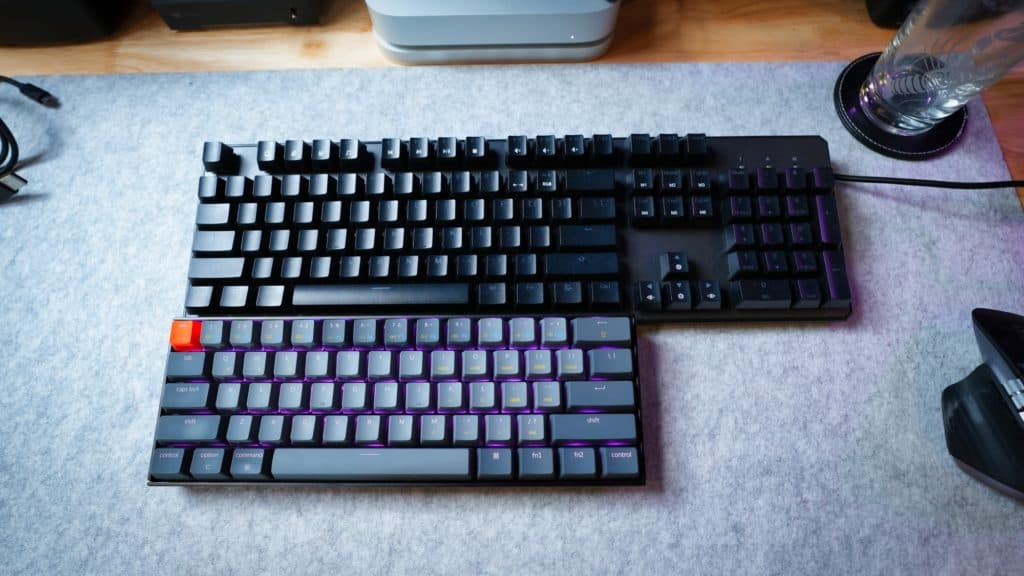 One of my (many) felt mats
You can find plenty of cool desk mats (and extra large mouse pads) on Amazon for cheap, and they will actually make a HUGE difference in the overall sound of your mechanical keyboard!
They dampen everything (and they look cool to boot). Choose from simple colors or cool designs, felt or leather, etc, etc.
4 - Add some foam inside your case
This mod is more advanced, and we have an entire guide to foam modding your keyboard here.
But even some cheap foam can reduce the resonance of your keyboard, making it softer.
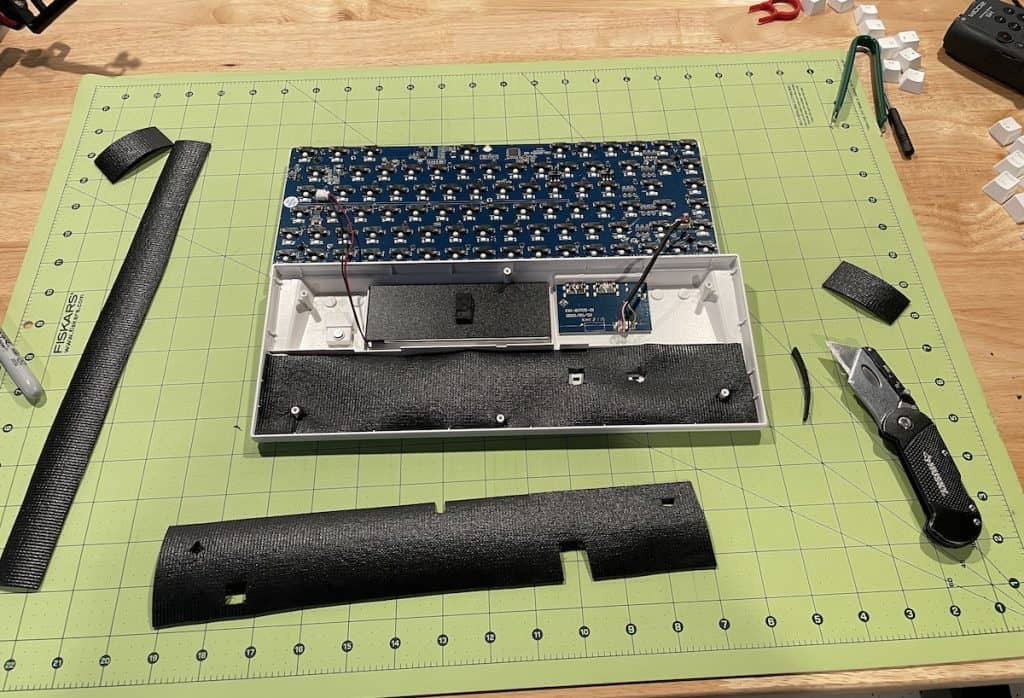
Here’s the basic process:
- Take your keyboard apart (carefully)
- Pick up your foam of choice (We like neoprene)
- Cut out the foam in the shape of your keyboard case (the bottom, below the PCB)
- Reassemble the keyboard and test that everything still works.
5 - Add some O-rings under your keycaps
Pick up some cheap o-rings on Amazon, and simply put them underneath the keycaps of your keyboard.
They make these in a few different colors (but you won’t really see them anyways—we recommend grabbing clear ones so any RGB backlighting will shine through to the fullest).
These will mute each keystroke right at the top of the stroke!
6 - Mod your stabilizers
This one is DEFINITELY more advanced.
Stabilizers reduce the wobble of the bigger keyboard keys (space bar, enter key, backspace key, etc), and they can often ADD to the volume (or make those keys sound scratchy or metallic).
There are several mods you can do to these:
- Lube your stabilizers
- Place a small piece of fabric (band-aids!) underneath them to mute their contact with the PCB
- Clip your stabilizers
See our full guide to modding your keyboard here!
But seriously, here’s the easiest way to silence your mechanical keyboard:
- Use linear switches (reds, blacks, or yellows)
- Use a desk mat underneath your keyboard
- Install cheap O-rings
That will get you 90% of the way to a REALLY quiet keyboard!
Final Verdict: Our Fave Quiet Keyboard:
Yes, ANY keyboard can be made quieter (with a few simple mods), but there are definitely some that come softer out of the box:
We recommend the Corsair Strafe if you can pay a little more, else you can pick up the Durgod Taurus or iKBC CD108 for under $100!
Happy clacking (but not TOO much clacking, obviously)
;)
Silent Keyboard F.A.Q.s
Are there silent mechanical keyboards?
Yes. There are a number of keyboards that are quieter in nature (due to increased padding or other modifications). Also, mechanical keyboards with linear “silent” switches are especially quiet.
What is the quietest mechanical gaming keyboard?
Really, any mechanical keyboard with linear switches is going to be on the softer side (as opposed to tactile switches or clicky switches), but our top 3 quiet keyboards are the Corsair Strafe RGB MK.2, the Das Keyboard 4, SteelSeries Apex Pro. All of these keyboards come with Cherry MX Red switches (but have other silent switch options as well).