The 9 Best Silent Switches for Your Keyboard (2023)


On This Page
Table of contents
On This Page
Table of contents
It’s no secret that mechanical keyboards are KNOWN to be loud.
But believe it or not, they don’t HAVE to be overly clicky, clacky, and loud!
And the best news?
There are loads of silent switches you can put into your keyboard, that still sound and feel amazing.
I’ve typed on hundreds of switches over the years, so here are my recommendations for the best silent switches:
- Kailh Deep Sea - Best Overall
- Gazzew Boba U4 - Best Tactile
- Kailh Box Muted Jade - Best Clicky
- Cherry MX Red or Black
- ZealPC Healios (and Zilents)
- Gateron Silent Switches
Down below, we’ll review these, as well as several other excellent silent switches!
How do silent mechanical switches work?
This depends on the switch! They all have slightly different ways of muting the sound.
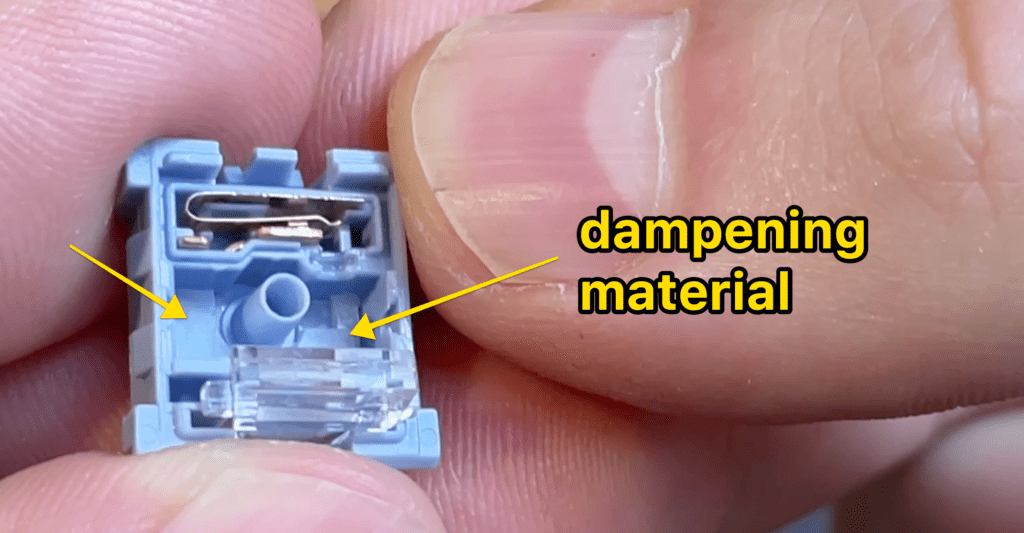
But in general, silent switches contain extra sound-dampening material within the switch housing, often attached to the switch stem.
This additional “soft plastic” material helps soften the contact the stem makes when you press the switch.
Other silent switches might also contain a tiny layer of “padding” in the bottom of the switch housing to help reduce echo (and be even quieter).
Kailh Deep Sea - Best Overall
https://www.youtube.com/watch?v=Y4tgNGfvlUM
Out of all the silent switches I’ve tried, these sound and feel the best!
They’re obviously silent, but somehow still retain a pleasant “crackly” sound (especially the space bar).
And of course they’re smooth (linear switches don’t have a “tactile bump” during the keypress. It’s a smooth motion down and back up).
Overall Takeaway: The Kailh Deep Sea switches use a unique sound-dampening mechanism that’s different than any other silent switch I’ve tried. This leads to a muted sound, but with just enough character to give a pleasant “crackly and thocky” sound. They feel stiff but fast, and not mushy at all. Personally, I think these are my favorite silent switch of all time.
I’ve tried Cherry MX Silent Reds, the VSii silent switches, and way more—and the Kailh Deep Seas are EASILY my favorite of the bunch.
(Your desk resonates, after all. Knock on wood).
3 - Foam mod your keyboard
A “foam mod” basically just means adding a layer of foam to your keyboard (usually between the PCB and the case).
You can go all-in and purchase Sorbothane on Amazon—or use drawer liner material.
This process will look different depending on your keyboard (and some keyboards already HAVE a layer of foam inside—so you’ll want to check that first)!.
Click here for our guide on foam modding.
4 - Mod your stabilizers
Stabilizers reduce the wobble of the bigger keyboard keys (space bar, enter key, backspace key, etc), and they can often ADD to the volume (or make those keys sound scratchy or metallic).
There are several mods you can do to these:
- Lube your stabilizers
- Place a small piece of fabric (band-aids!) underneath them to mute their contact with the PCB
- Clip your stabilizers
This is going to be a fair amount of work, and requires you to purchase more stuff!
See our full guide to modding your keyboard here.
AVOID these loud switches
If quietly working or gaming is your goal, be sure to avoid the following switches (which are known for their volume).
- Kailh Box Jades (or Pinks or Navys or Whites): All of the Kailh Box Clicky switches are going to be pretty loud, but these are the loudest.
- Cherry MX Blues: These aren’t nearly as loud as the Kailh Box switches, but the click mechanism results in a much higher-pitch click—which can get really annoying.
- Glorious Pandas (or any tactile switch that has the word “panda” in it): These tactile switches tend to have a sharper tactile bump, and just a bit more volume (though not annoying at all)!
In general, you’ll want to stick with either silent switches or standard linear switches (which are generally quieter than their tactile or clicky counterparts).
Conclusion: Why silent switches?
Although the pleasant clicky, clacky, and thocky sounds are why this hobby exists—there’s definitely a time and place for quietness!
Whether you’re trying to focus on work, want to be respectful of others in your household, or just don’t LIKE all that noise, silent switches are a great option.
And with this list, you can find an option that still sounds and feels great!
Silent Switch F.A.Q.s
What switches are quietest?
Out of all the switches on this list, the Cherry MX Silent Blacks are going to be the quietest (followed closely by the ZealPC Zilent and Gazzew Boba U4 switches). They’re also far quieter than typical mechanical switches, but the heavy operating force of the Cherry MX Silent Black, combined with the sound-dampening mechanism, results in a super-quiet keypress.
What is the best silent switch?
This will come down to personal preference, but we think these are the best silent switches you can buy:
- Kailh Deep Sea (linear): Best Overall
- Gazzew Boba U4 (tactile)
- Cherry MX Silent Black (linear)
- Kailh Box Muted Jade (clicky)
What are the Best Silent Switches for Typing?
For typing, we recommend using a tactile switch, so the Gazzew Boba U4 silent switches are our top recommendation. However, the ZealPC Zilent switches are also a fantastic silent tactile switch with several weight options.
What are the Best Silent Switches for Gaming?
Since most gamers prefer a smooth linear switch, we recommend either the Cherry MX Silent Reds, Kailh Deep Sea Oceans, or the Gateron Silent Yellow switches. All of these are completely silent, but still offer a smooth and fast feel and satisfying sound to game on.
What are the Best Silent Switches for the Office?
If you use your keyboard in an office setting, we recommend either the ZealPC Zilent or Gazzew Boba U4 switches. These are both silent and tactile (generally preferred for typing and work). They’ll feel great, even with longer typing sessions.