Cherry MX Switches: A Complete Guide & Comparison (2023)

On This Page
Table of contents
On This Page
Table of contents
Cherry MX switches are THE original switch for mechanical keyboards.
They’ve been around for decades, and are STILL popular (and for good reason)!
But which Cherry switches are best?
There’s still a ton to choose from—from the classic MX Reds to the new MX Ergo clears. Linear? Tactile? or Clicky?
In this guide, we’ll break down the different Cherry MX switch options, as well as a thorough review and sound test!
I’ve personally typed on 100+ switches at this point, and I’ll help you find the right Cherry switch for your keyboard needs 😎
Let’s clack!
Quick Switch Recommendation:
Before we dive into the details, here are my purchasing recommendations if you’re a beginner looking for some Cherry MX switches:
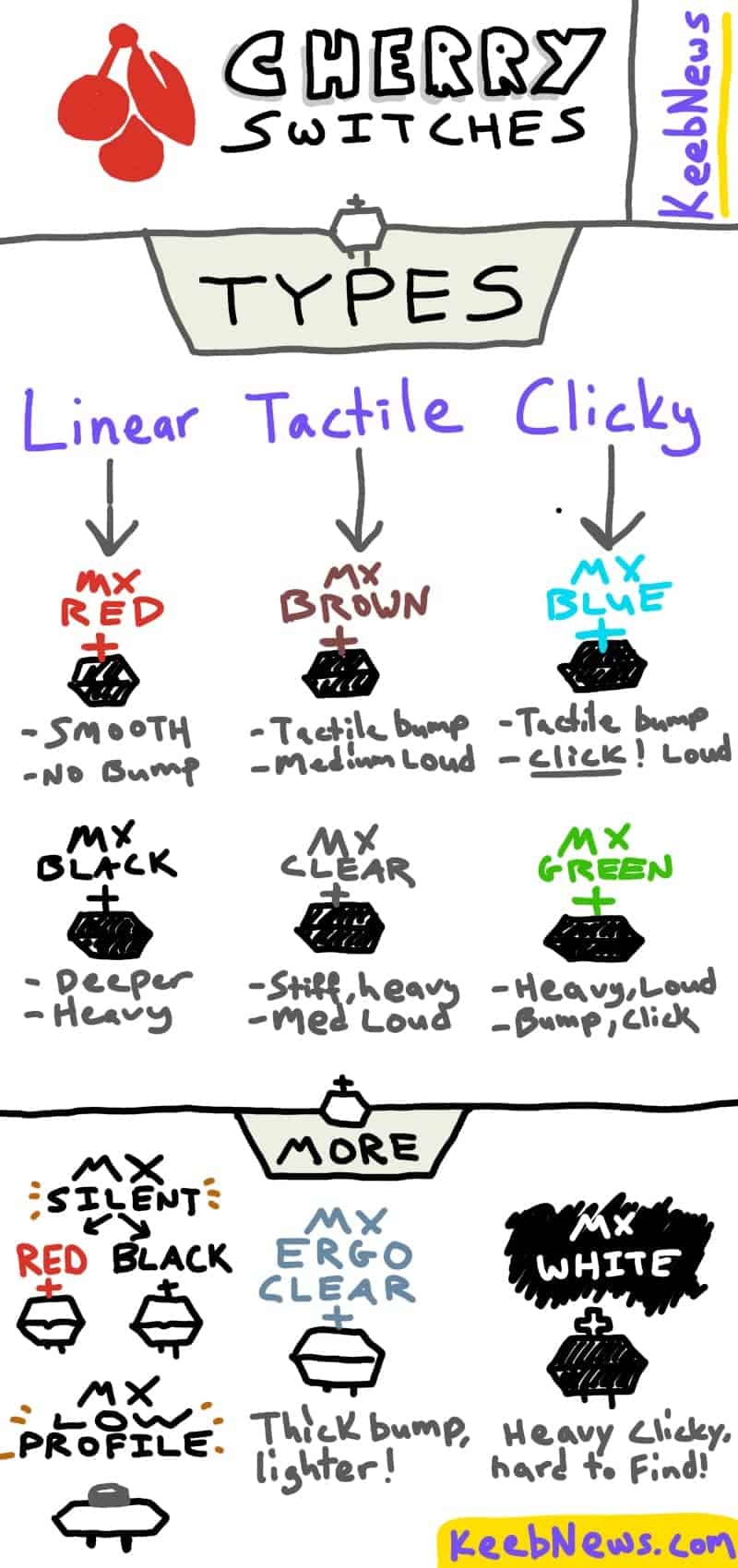
If you’re primarily a gamer, try the Cherry MX Reds or Blacks. The reds will feel lighter and faster and have a smooth & tappy sound. The MX Blacks will feel heavier & smoother, and sound deeper.
If you work on a computer (and type a lot), we recommend a tactile or clicky switch:
- MX Brown (tactile) - clacky sound and you can feel the tactile bump. Would also be fine for gaming!
- MX Blue (clicky - clacky & clicky sound (louder) and also has a light tactile bump. Probably wouldn’t be great for gaming!
If you’re looking for a heavier resistance, try the MX Clear (tactile) or MX Green (clicky).
If you MUST have a quiet keyboard, try the MX Silent Black switches.
Cherry MX Switch Comparison
Here’s a quick color chart for the most popular Cherry MX switches (and we’ll cover the less popular switches below that) 👇
Switch
Type
Actuation Force
Feel
Sound
Recommended for…
Linear
45g
Light and Smooth
Quiet
Gaming
Linear
45g
Light and Smooth
VERY quiet
Gaming, or when you need the softest switch possible.
Linear
60g
Heavy and Smooth
Quiet
Gaming
Linear
63.5g
Heavy and Smooth
Slightly less quiet than normal Blacks
Gaming
Linear
60g
Heavy and Smooth
VERY quiet
Gaming, or when you need the softest switch possible.
Linear
45g
Light and Smooth
Quiet
Gaming
Tactile
55g
Medium & Tactile
Medium
Gaming & typing
Tactile
65g
Heavy & Tactile
Medium
Gaming & typing
MX Ergo Clear
Tactile
55g
Medium & Tactile
Medium
Gaming & typing
Tactile
80g
SUPER heavy & Stiff
Quiet
Gaming & typing
Clicky
60g
Medium & Tactile
Louder
Typing & annoying your coworkers
Clicky
80g
Heavy & Tactile
Louder
Typing & annoying your coworkers
Clicky
80g (probably)
Heavy & Tactile
Louder
Typing & annoying your coworkers
There are also some low-profile Cherry MX switches as well.
We’ll go over all these switches below in detail—as well as make some general switch recommendations for you.
Switch Glossary
If you’re new to the world of mechanical keyboards, here are some definitions of some common switch terms you’ll see a lot:
Actuation
When the switch + PCB actually REGISTERS the key was pressed (it’s somewhere in the middle of the keystroke)
Actuation Force (Operating Force)
The force required to activate the keystroke (in grams). 45g is a “lighter” switch than a 70g switch
Pre-travel distance
The distance the stem has to travel to actuation (in mm)
Total Travel distance
The entire length of the keypress, until the switch “bottoms out,” i.e. “goes all the way down” (in mm)
“thock”
“Thock” is a general term to describe the sound of mechanical keyboards, usually indicating a deeper-pitched sound. Heavy linears often “thock.”
Hyperglide
These are the normal Cherry switches (using the latest “hyperglide tooling” manufacturing process to make them smoother and more precise)
Linear
Linear switches do NOT have a tactile bump during the keypress. It’s smooth all the way down and back up.
Tactile
Unlike linear switches, tactile switches have a tiny “bump” during the keypress (near the actuation point) that helps your fingers “feel” when the key was activated
Clicky
These are just tactile switches, but with the addition of a tiny clicking mechanism to produce a high-pitched “click” noise
Current Cherry MX Switch Lineup
Here’s the current lineup of Cherry’s MX switch choices, as well as some switch info and my thoughts on each one!
Cherry MX Red (linear)
Type
Actuation Force
Sound & Feel
Best for
Buy them at…
Linear
Not sure! Either 55g, 70g, or 80g
Similar to Cherry Greens
Typing
The Cherry MX Whites are a VERY rare switch that’s almost impossible to find.
They’re not even listed on Cherry’s website anymore.
Dislaimer: I’ve never typed on these switches!
I was able to locate them on Amazon, and I believe the actuation force is likely 80g (heavy like the MX Greens), but different vendors have different information!
Since they’re going to cost way more even when you can find them—I’d personally recommend sticking with either the MX Blues or MX Greens if you want a clicky switch.
Cherry MX Low-Profile Switches (linear)
Switch
Type
Actuation Force
Sound & Feel
Best for
MX Low-Profile Red
Linear
45g
Low-action, smooth and fast
Gaming
MX Low-Profile Speed
Linear
45g
Same, but VERY fast
Gaming
Cherry MX low-profile switches offer roughly the same sound and feel as regular MX switches, but are 35% thinner (and require your fingers to do MUCH less work).
These can be nice if you suffer from wrist pain, carpal tunnel, etc!
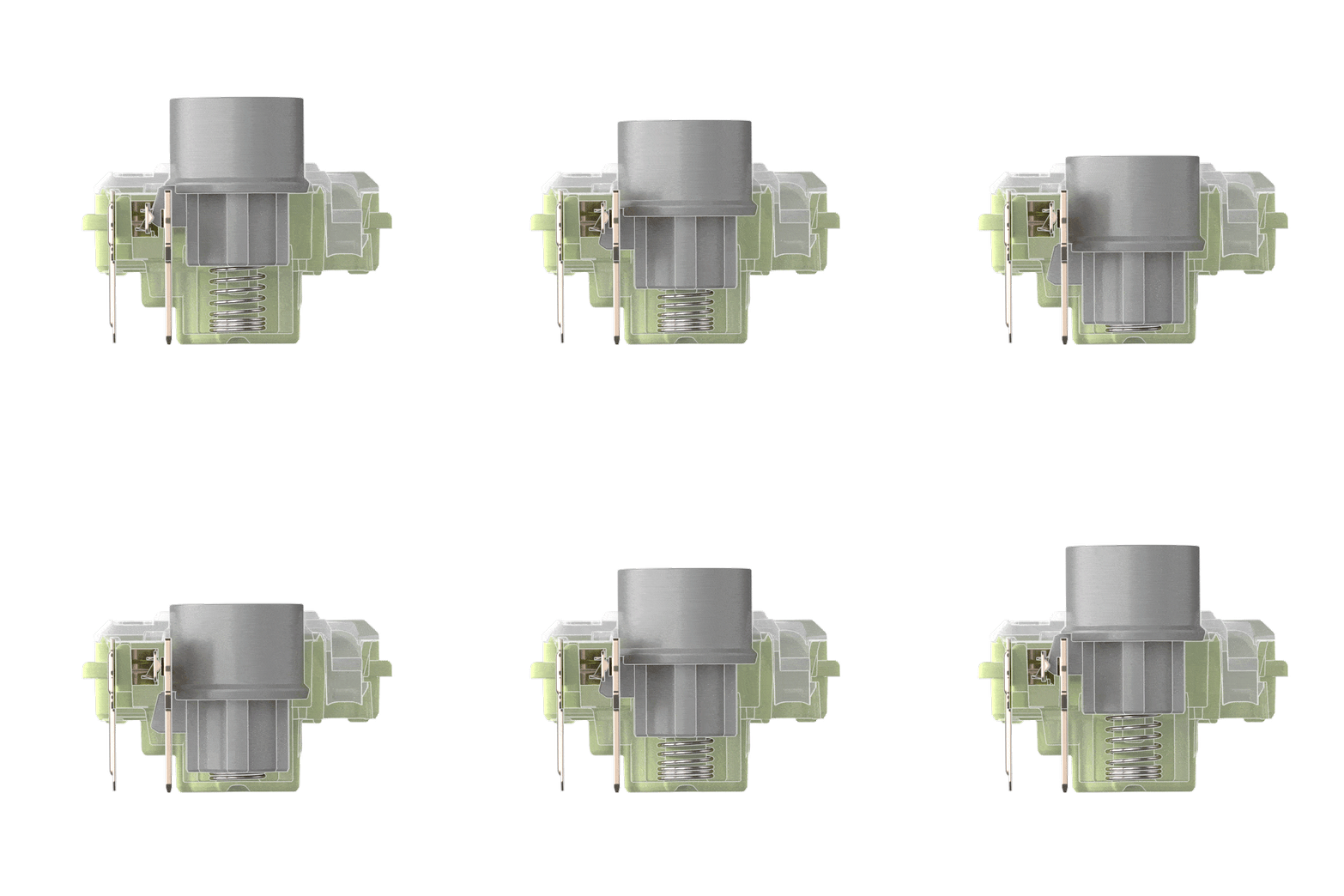
The main difference between the MX low-profile Reds and Speed Silver is the travel distance:
- MX low-profile Red: 1.2mm pre travel, 3.2 total travel
- MX low-profile Speed: 1mm pre travel, 3.2 total travel
It’s a tiny difference.
They are typical found with low-profile keycaps as well (see our guide to keycap profiles here)
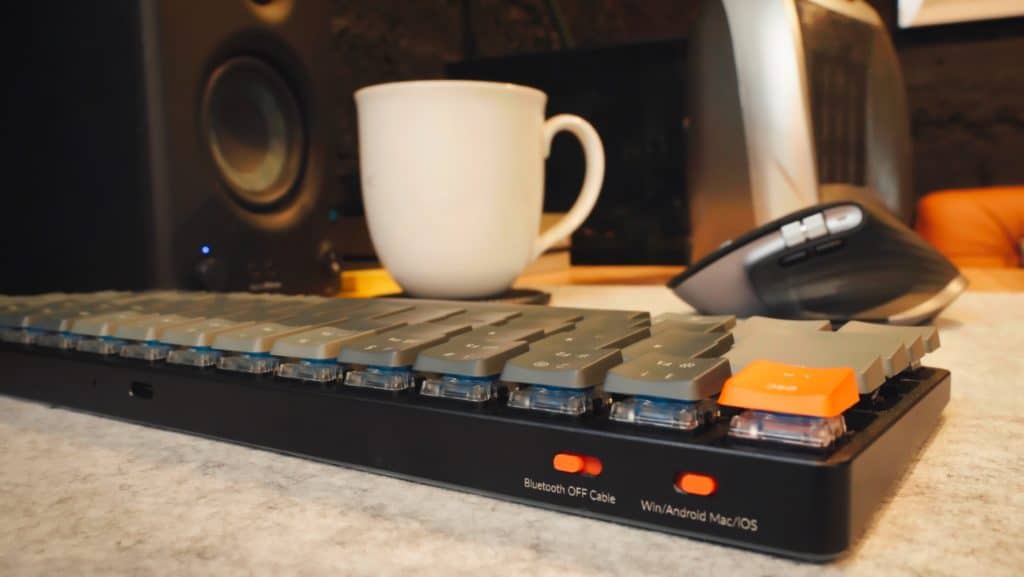 One of my low-profile keyboards
MX Ultra Low-Profile (not MX-style)
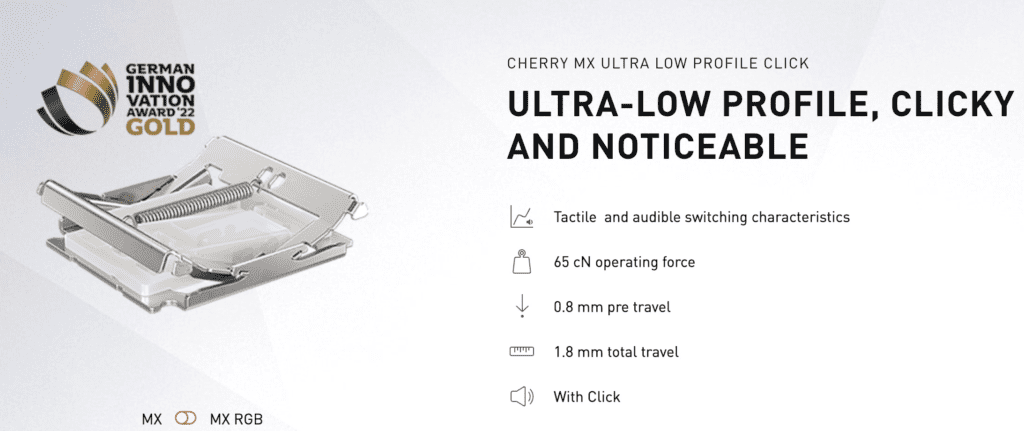
Just for the sake of being complete, it’s worth noting that Cherry does make laptop switches.
These are NOT for purchasing separately and installing in your mechanical keyboard!
The make two versions, a tactile and a clicky!
Both of these have high operating force (65g), despite a tiny pre-travel distance of 0.8mm.
At the time of this writing (early 2023), the MX ULP switches are exclusive to Alienware gaming laptops (like the M17), though they’ll likely show up in several different 3rd party laptops going forward.
How do Cherry MX switches work?
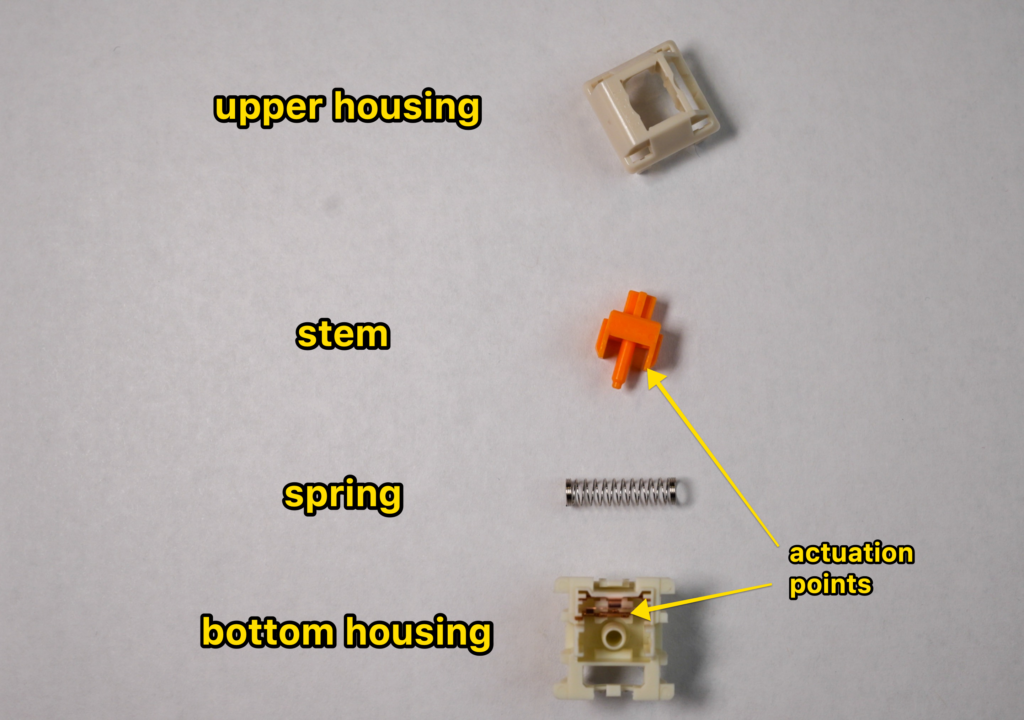
Here’s a breakdown of the different parts of a mechanical switch:
- Keycaps (not part of the switch): The keycaps are the part of the switch that you actually touch. They’re usually made from ABS or PBT plastic, and come in tons of different colors & styles! (and shapes and profiles). Click here to see our list of the best keycaps you can buy.
- Switch stem: This is the part of the switch that extends down into the switch and moves up and down when you press the keycap (it’s connected to the underside of the keycap). The stem is generally colored to match the switch color. I.e. green switches usually have green stems
- Upper housing: This is the part of the switch that contains the spring and rests on top of the lower housing. It has a hole in the center for the stem to fit into (the upper and bottom housings snap together, and you need a “switch opener” tool to take them apart. Or a flathead screwdriver, but that’s harder).
- Spring: This is what provides the resistance when you press a key down, and also gives it that “bouncing” feeling.
- Lower housing: The bottom half of the switch “shell” or “box.”
Here’s how a switch works:
- You press the keycap
- Which presses the stem down (compressing the spring, which provides resistance)
- The stem makes contact with the gold-alloy “leaves” (the copper part in the bottom housing)
- This sends an electric signal down to the keyboard PCB (circuit board)
- The keystroke is registered
About Cherry (The Company)
Cherry AG was founded in 1953 by Walter Cherry in Illinoise, USA.
They continued to make various computer devices for years, and released the first Cherry keyboard in 1973, and the Cherry MX switch in 1983.
Since 1983, Cherry has been one of the largest brands in mechanical keyboards and mechanical switches.
They are currently headquartered in Munich, Germany.
Conclusion: Are Cherry MX switches any good?
Yes, Cherry MX switches are still some of the best mechanical switches on the market. Since the company has been around for decades, they have refined their manufacturing process and produce switches of the highest quality (Cherry MX Hyperglide switches).
Even though they might cost a bit more (averaging around $0.75-$1.00 per switch), their switches are rated to last up to 100 million keystrokes, and are still heavily favored in the mechanical keyboard communities.
We recommend starting with the Cherry MX Red if you’d like a linear switch for gaming, or the Cherry MX Clears if you type/work a lot on your computer!
That said, you really can’t go wrong with Cherry switches…
They’re popular for a reason: they’re still fantastic!
Happy thocking (or clicking)!
Cherry MX Switch F.A.Q.s
Are Cherry MX the best switches?
Not necessarily. Though Cherry switches have been around for decades are very high quality—there have been a number of “Cherry MX clone” switches come to the market in the past decade, some of which are fantastic and affordable! Which switch you choose will come down to personal preference (for sound and feel).
Brands like Gateron, Akko, Outemu, Razer, and Kailh are also very popular in mechanical keyboard communities.
What is the difference between Cherry MX switches?
Cherry is one of the oldest switch manufactures in the keyboard world, and their switches are well-known for being high-quality and pleasant to type and game on. That said, many other switch brands, like Gateron, Kailh, and Razer, etc, also make “MX-style” switches that will fit the same keyboards, and are often much cheaper (and still great)!
Which Cherry MX switch is best for gaming?
The Cherry MX Reds and MX Speed Silvers are by far the most popular gaming switches from Cherry. The MX Reds are light and smooth, and the MX Speed Silvers are the same thing except with a slightly faster pre-travel distance to activating the keystroke. The Cherry MX Blacks are also a popular linear switch for gaming, though they’re much heavier and deeper sounding.
Which Cherry MX switch is best for typing?
The Cherry MX Browns and MX Clears (both tactile switches, though the MX Clears feel heavier) are generally recognized as the best Cherry switches for typing and work. The tactile bump of these switches can lead to more accurate typing, improved typing speeds, and even reduce finger pain. The Cherry MX Blues and MX Greens are also great for typing (they’re both clicky switches).
Is Cherry MX Red or brown better?
This will come down to personal preference based on how you want your switches to sound and feel. The MX Red switches are linear (meaning the keypress is smooth), and are a bit softer in sound. The MX Browns are a tactile switch (with a tiny tactile bump during keypress) that are a bit louder, and better for typing.
Is Cherry MX Blue or Red better?
This will come down to how you use your keyboard, and the sound you prefer. The MX Reds are a linear switch that is light & smooth & great for gaming, while the MX Blue is a clicky switch with a tactile bump (which some people prefer for typing). The MX Blues are much louder and feature a high-pitched “click” noise that some people find annoying.